Field Service Automation: Fewer Trips With Agentic AI and Offline Work

Field Service Automation: Fewer Trips With Agentic AI and Offline Work

Field service automation uses software to handle scheduling, dispatch, mobile work orders, and customer communication so technicians spend more time fixing things and less time on paperwork. Organizations that automate well push first-time-fix rates toward 88%, a 28-point gap over bottom performers stuck near 60%. That gap translates directly into fewer repeat trips and faster resolution times.
TL;DR:
- Failed visits consume 25% of service costs on average, reaching 44% for bottom performers; unified workforce data can support modeled savings up to 26%.
- Operational AI can rebook jobs, notify customers, and update inventory, but it needs unified scheduling, parts, and customer records to act reliably.
- Pilot with one crew or region, verify work order and parts data, test a full shift offline, and compare KPIs after four to six weeks.
- For small trade crews, capturing job conversations through voice and photos can turn field details into quotes and invoices, avoiding paperwork later that evening.
HechitoSpend Less Time on Job PaperworkHechito captures job conversations and details through voice and images, then organizes them into records, quotes, and invoices.Visit Hechito
Table of Contents
- What field service automation actually means
- Core components and features to evaluate in automation software
- Benefits, benchmarks, and the ROI you should expect
- How AI and agentic platforms change what automation can do in 2026
- Implementation checklist: prepare, pilot, measure, and scale
- Technical priorities: offline-first architecture and sync policies
- Practical use cases: contractor crews, mid-market teams, and enterprise scale
- What this guide gets wrong if you only chase the headline numbers
- Getting started with Hechito for contractor-focused automation
- FAQ
- Sources
What field service automation actually means
Field service automation is the set of software capabilities that remove manual steps from scheduling, dispatching, documenting, and closing out field work. Field service management, or FSM, is the broader system of record that holds customer data, asset history, inventory, and billing. Automation lives inside FSM: it is the layer that acts on that data without a person typing, calling, or re-entering information at every step.
The distinction matters because many teams buy an FSM platform expecting automation and get a digital filing cabinet instead. A true automation layer should handle:
- Matching jobs to technicians based on skill, location, and time window without manual review
- Generating routes and adjusting them when a job runs long or a cancellation opens a slot
- Converting field notes, photos, or voice memos into structured work order updates
- Triggering customer notifications and follow-up requests without staff intervention
The 2026 shift in this space is from assistive AI—tools that suggest or summarize for a human to approve—to operational or agentic AI, where software completes multi-step tasks end to end. A scheduling assistant that recommends a technician is assistive. A scheduling agent that rebooks a canceled job, notifies the customer, and updates inventory holds is operational. The difference shows up in how much manual cleanup your team still does after the software “helps.”
Core components and features to evaluate in automation software
Not every platform that calls itself automated actually removes work from your team’s day. The features below are the ones that determine whether a tool pays for itself or just adds another screen to check.
- Automated scheduling and skill matching: the system should assign jobs by technician skill, certification, and available time window without a dispatcher manually cross-checking a spreadsheet.
- Route optimization and live tracking: routes should recalculate in real time when a job runs over or a new request comes in nearby.
- Mobile work orders with digital forms: technicians need to close out jobs from a phone, including photo capture and signature collection on site.
- Voice capture for field notes: converting spoken updates into text saves techs from typing on a small screen between jobs.
- Parts and inventory integration: the system should know what’s in the truck and the storeroom before dispatching a job that needs a specific part.
- Customer self-booking and automated notifications: appointment reminders and arrival windows reduce no-shows and callback volume.
- Billing and CRM integrations: a job that closes in the field should flow into invoicing without a second data entry pass.
Pro Tip: Test any shortlisted platform’s mobile app with your actual technicians for a full day before signing a contract. Office demos rarely surface the friction that shows up on a real job site.
Parts and inventory integration deserves particular attention because it is where failed visits often start. A technician who arrives without the right part has to reschedule, and that single failure cascades into customer dissatisfaction, wasted drive time, and a second labor cost for the same job. Scoping inventory data to the technician’s assigned storerooms rather than the full warehouse catalog keeps the mobile app fast and keeps the information relevant to the job at hand.

Benefits, benchmarks, and the ROI you should expect
Top-performing field service organizations hit roughly 88% first-time-fix rates, compared with 60% for bottom performers. That 28-point gap is not a rounding error. It represents the difference between a technician fixing the problem on the first visit and a customer waiting days for a second appointment.
Failed visits carry a direct cost. Across the industry, failed visits represent a median of 25% of total service cost, and for bottom-performing organizations that share can climb to 44%. Organizations that move their practices toward top-performer behavior can model service-cost savings of up to 26% by scaling knowledge and unifying data across the workforce.
The gap also shows up in how work gets planned, not just how it gets executed. Top performers run far more preventative maintenance: their reactive-visit share sits near 55%, versus 94% for bottom performers, and their preventative maintenance stays effective for roughly 162 days compared with 62 days at the bottom. Translating these benchmarks into targets for your own operation means tracking:
- Your current first-time-fix rate against the 60% to 88% range
- The share of total service cost tied to failed or repeat visits
- Your reactive-to-preventative visit ratio over a rolling quarter
Fewer failed visits also shorten the cash-conversion cycle: a job closed correctly on the first trip can be invoiced immediately instead of waiting on a second appointment.
How AI and agentic platforms change what automation can do in 2026
The practical shift in 2026 is from scattered point tools, each solving one narrow problem, to a shared intelligence layer that lets specialized agents act across the whole job lifecycle. A troubleshooting agent that can see asset history, past repair notes, and parts availability makes a smarter recommendation than one that only sees the current ticket. The Aquant 2026 Field Service Benchmark report frames this as moving from assistive AI to operational AI, where agents complete tasks rather than just suggesting them.
A few examples make the distinction concrete:
- A troubleshooting agent pulls equipment history and prior fixes to suggest a diagnosis before the technician even arrives.
- A scheduling agent rebooks a canceled appointment, finds the nearest qualified technician, and sends the customer a new window automatically.
- A knowledge capture agent turns a technician’s voice notes from a tricky repair into a structured entry other technicians can search later.
None of these agents work reliably on fragmented data. If scheduling lives in one system, parts inventory in another, and customer history in a third, an agent trying to act across all three either fails silently or produces recommendations nobody trusts. Unifying data into a shared intelligence layer is the prerequisite, not an optional upgrade, for agentic automation to deliver the benchmark gains described above. Stacking several disconnected point solutions without that unification tends to recreate the same manual reconciliation work automation was supposed to eliminate.
Implementation checklist: prepare, pilot, measure, and scale
Rolling out automation works best as a staged process rather than a single large switch.
- Audit data readiness: confirm work orders, asset records, parts catalogs, and technician knowledge bases are accurate enough to automate against.
- Scope a pilot narrowly: pick one crew, one region, or one job type rather than deploying to the whole workforce at once.
- Define measurable KPIs before launch: track first-time-fix rate, average handle time, and failed-visit share from day one.
- Test offline behavior deliberately: run the pilot with Wi-Fi and cellular disabled for a full shift to confirm the app behaves correctly with no signal.
- Set sync and conflict rules in writing: decide who wins when two updates to the same job conflict, and document it before go-live.
- Train and incentivize adoption: pair training sessions with simple incentives tied to using the new workflow, not just completing it.
- Review and scale: after four to six weeks, compare pilot KPIs against your benchmark targets before expanding to additional crews.
Pro Tip: Run your offline test under real conditions, not a lab simulation. Disable connectivity and simulate a full technician shift before trusting a vendor’s claims about sync reliability.
Change management often determines success more than the software itself. A platform with excellent automation features still fails if technicians route around it because the training was rushed or the incentives reward the old paper-based habit. Measuring adoption, not just KPI improvement, catches that problem early.
Technical priorities: offline-first architecture and sync policies
Field technicians work in basements, rural job sites, and buildings with poor signal, so an automation platform’s technical architecture matters as much as its feature list. A local database paired with a durable outbox and delta sync is a baseline requirement, not a nice-to-have, for reliable offline-first field apps.
Key architecture priorities to evaluate when assessing a platform or briefing an internal engineering team:
- Data-set scoping by assignment: mobile devices should only sync the work orders, assets, and job plans relevant to a technician’s assigned work, not the full organizational dataset, which keeps sync times fast and storage manageable.
- Staged sync for inventory: scoping parts data to one to three storerooms per technician, rather than the entire warehouse, avoids bloated mobile datasets.
- Explicit conflict resolution rules per object type: a global “server wins” policy can be dangerous. Scheduling changes might reasonably default to the server, but safety flags should be append-only and reviewed by a person rather than silently overwritten.
- Resumable media uploads: photo and voice files should upload in the background and resume automatically after a dropped connection, with metadata attached so nothing gets lost.
- Audit trails: every change, especially to safety-related fields, needs a record of who made it and when.
These details rarely show up in a sales demo, which is why practitioner-level testing, including forced app kills and reconnect simulations, catches problems that a polished walkthrough will not.
Practical use cases: contractor crews, mid-market teams, and enterprise scale
The benchmark gains described above look different depending on the size and structure of the field operation.
- Small trades and contractor crews: the biggest win is converting voice notes and photos taken on site directly into quotes and invoices, cutting the after-hours paperwork that eats into evenings, and operating bilingually when crews or customers speak Spanish as well as English.
- Mid-market service teams: route optimization combined with storeroom-scoped parts data cuts failed visits by making sure the right technician with the right part shows up the first time.
- Enterprise field operations: a unified intelligence layer lets troubleshooting, scheduling, and knowledge capture agents work together across thousands of jobs, scaling the practices that separate top performers from the rest of the industry.
Each scenario shares the same underlying principle: automation only delivers the benchmark gains when the data behind it is unified and the workflow removes real manual steps, not just rearranges them.
What this guide gets wrong if you only chase the headline numbers
The organizations that reach it got there by fixing data quality and workflow friction first, not by buying the platform with the longest feature list. A crew still filling out paper tickets at the end of a shift, then re-typing them into a desktop system, will not see benchmark gains from a scheduling upgrade alone.
The more useful question is where the manual re-entry happens in your current process, because that is almost always where the time and the errors live. For a lot of contractors and tradespeople, that point is the gap between finishing a job conversation on site and getting a quote or invoice typed up later that night. Closing that specific gap, capturing the job details in the moment through voice and photos rather than reconstructing them from memory, tends to produce a faster, more visible improvement than a broader scheduling overhaul. Bilingual capture matters here too: a crew that speaks both English and Spanish shouldn’t lose accuracy translating notes after the fact.
— Francisco
Getting started with Hechito for contractor-focused automation
We built Hechito around the specific moment most automation platforms miss: the conversation on the job site. Instead of asking you to type notes after the fact, we capture the voice and photos from your actual customer conversation and turn them into an organized quote or invoice without extra typing. For crews who work in both English and Spanish, documents come out clean in whichever language the job requires.
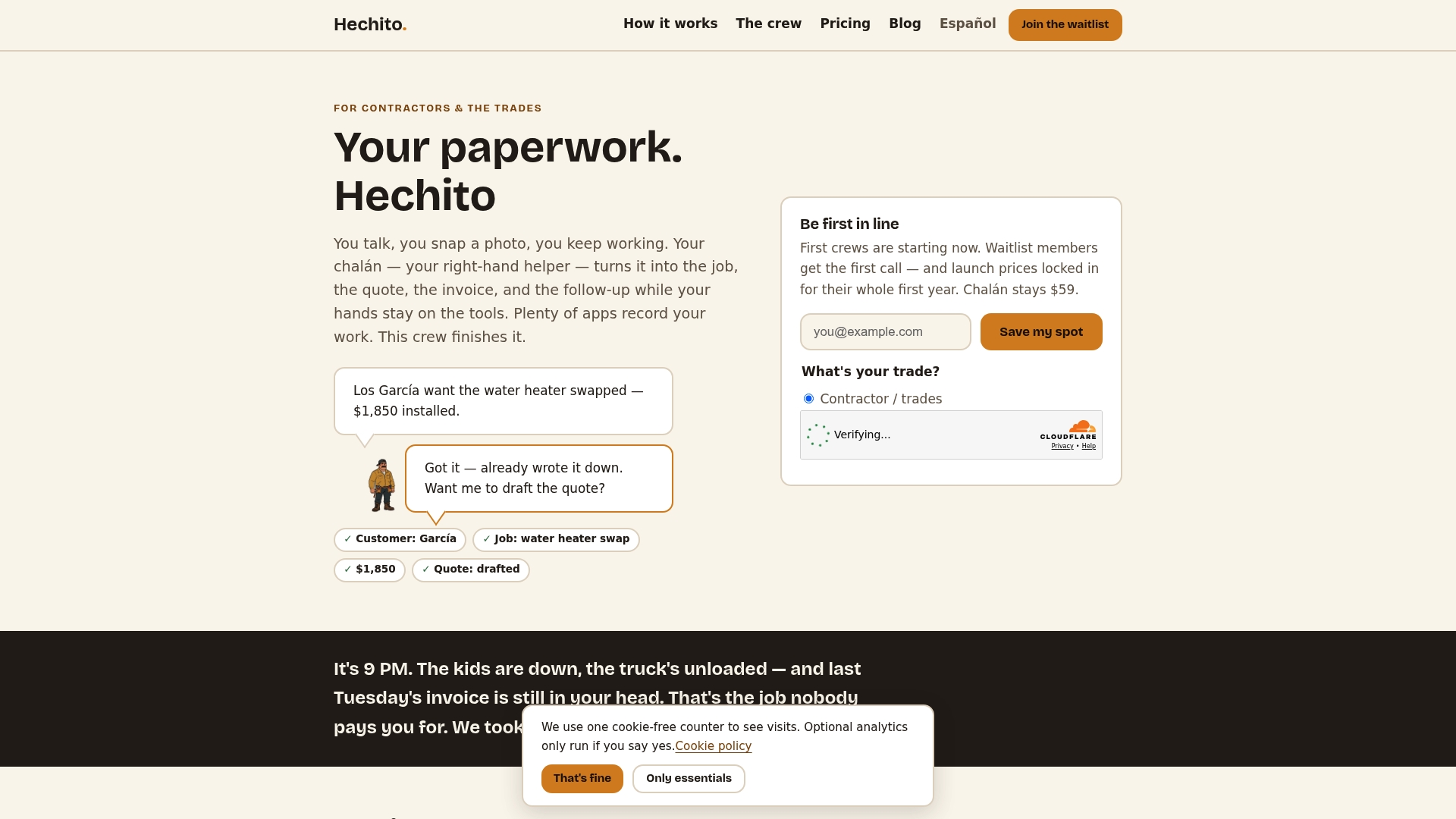
Hechito fits best for contractors and small trade crews who want to eliminate after-hours paperwork and get paid faster, rather than enterprise operations managing thousands of technicians across regions. If you’re considering a pilot, it helps to prepare:
- A handful of recent jobs you can re-run through voice and photo capture to compare against your current invoicing time
- Your typical quote-to-invoice workflow so you can see where the manual steps currently sit
- Any existing bookkeeping or bank reconciliation process you’d want matched to incoming jobs
Our plans, Chalán, Lupita, and Godínez, cover field capture, bilingual phone answering, and bookkeeping that matches your bank to your jobs. You can review current plan details and pricing or start directly with Chalán for voice-driven quotes and invoices from the job site.
FAQ
What is field service automation?
Field service automation refers to software that handles scheduling, dispatching, documentation, and customer communication for field technicians without manual re-entry at each step. It sits inside a broader field service management system but focuses specifically on removing repetitive manual tasks from the technician’s and dispatcher’s day.
What is the difference between FSM and a CRM?
Field service management software is built around dispatching technicians, tracking assets, and managing work orders in the field, while a CRM centers on sales pipelines and customer relationship history. The two often integrate so that a service call logged in the field updates the same customer record a sales team uses, but they solve different core problems.
What are examples of professional services automation (PSA) software?
PSA software typically manages project tracking, resource scheduling, time and expense capture, and billing for professional service firms rather than field trades. It overlaps with field service tools in scheduling and invoicing but is generally built for project-based service delivery rather than dispatched technician visits.
What does the SAP field service management process look like?
SAP’s field service management process typically covers work order creation, technician scheduling and dispatch, mobile execution with digital forms, and integration back into SAP’s broader ERP for billing and inventory. The exact steps vary by implementation and the specific SAP modules a company has deployed.
How do I start implementing field service automation?
Start by auditing whether your work order, asset, and parts data is accurate enough to automate against, then pilot the automation with a single crew or region before expanding. Track first-time-fix rate and failed-visit share from day one so you can measure whether the pilot is closing the gap toward top-performer benchmarks.
Sources
- Aquant 2026 Field Service Benchmark report
- Aquant’s 2026 Field Service Benchmark: Companies Can Unlock up to 26% in Service Cost Savings
- Maximo Mobile at scale: data sets, sync policies, and the field workflow that actually works
- How to build a field service app with offline mode that works with no signal
Recommended
This is the paperwork Hechito does for you — while you talk.