Daily Construction Logs: 7 Fields for Contractor Payroll and Claims

Daily Construction Logs: 7 Fields for Contractor Payroll and Claims

A daily construction log is the contemporaneous record of what happened on site that day, and it must capture weather, labor, and work performed at a minimum. A dependable method is a short template, time-stamped photos, and voice dictation, with entries completed and submitted before you leave the site.
TL;DR:
- Build fields around contract specifications, which may require subcontractors, personnel counts, equipment, deliveries, weather, accidents, and delays beyond a basic checklist.
- Capturing updates throughout the shift can keep completion to 10 to 15 minutes, compared with an hour spent reconstructing events afterward.
- Record labor by trade, headcount, and hours, then reconcile weekly with payroll; federally funded projects also require alignment with certified payroll.
- OSHA requires injury recordability decisions within seven calendar days and retention of OSHA 300 logs for five years; daily logs do not replace required forms.
- Match log entries to invoice lines and photos; document who directed extra work, its timing, and the labor and materials used to support change orders.
HechitoCapture Job Details As They HappenHechito captures customer conversations and job details through voice and images, then turns them into organized records without extra typing.Visit Hechito
Table of Contents
- What goes into every daily construction log
- Templates and formats: paper, spreadsheet, or mobile form
- Field routine: how to log fast and stay defensible
- Faster capture with photos, voice notes, and mobile features
- Legal and contract touchpoints your log should feed
- Submitting, storing, and retaining your logs
- Connecting daily logs to invoicing and billing
- How daily logs drive project management and progress tracking
- Examples of using bilingual digital tools for fuller logs
- A field note on capturing the day as it happens
- How we help you capture the job without the paperwork
- FAQ
- Sources
What goes into every daily construction log
A log earns its keep when anyone can read it months later and reconstruct the day. Contract specifications commonly ask for subcontractors, personnel counts, equipment, deliveries, weather, accidents, and delays, so build your fields around that list and make each entry specific.
- Header: date, project name, area of the site, shift start and end times, and the author’s name with a signature or e-signature.
- Weather: high and low temperatures plus the hours rain or wind started and stopped. Timestamps matter because a recorded rain delay is a fact, while “rainy morning” is an opinion.
- Labor: each subcontractor and trade, headcount, and hours worked. On projects with certified payroll, these numbers must match what you report later.
- Equipment: unit IDs, operating hours, and idle time with the reason.
- Materials and deliveries: quantities, delivery times, storage location, and who accepted the load.
- Work performed: location-specific and measurable, such as “poured concrete in the area between gridlines C and F during the morning.”
- Delays, inspections, and safety events: start and end times, effect on the schedule, and your immediate response.
Precision is the whole point. Vague entries cannot support a billing request or a dispute.
Templates and formats: paper, spreadsheet, or mobile form
Pick the format that matches how much auditability and speed you need, then customize it to the fields above.
- Paper or PDF: the simplest option and fine for small crews. A fillable PDF lets you type on a tablet, and you can save one file per date.
- Excel or Google Sheets: better for totals and trends. Keep one row per entry, then export each date to PDF so the submitted record is fixed in place.
- Mobile app forms: fastest in the field, and they usually add automatic timestamps and version history, which strengthens the record.
Whatever you choose, the minimal field set is the list from the previous section: header, weather, labor, equipment, materials, work performed, and events. A template that is just checkboxes loses value, so leave room for quantities, times, and short notes. Free templates from owners, agencies, and trade groups are easy to find. Adapt them by adding your project’s gridlines, area names, and the specific items your contract spec requires.
Field routine: how to log fast and stay defensible
The legal weight of a log depends on timing. Records written at or near the time of events hold up far better than notes reconstructed days later. A good routine can keep logging to 10 to 15 minutes.
- Start of day: record the date, crew list, weather, and planned work before the first task begins.
- Mid-shift: photograph deliveries as they arrive, note any inspection or delay with its start time, and jot quantities completed so far.
- End of day: confirm headcounts and hours, finish work-performed entries, add open issues, and sign.
- Submit before leaving site: upload or send the log and wait for confirmation that it arrived.
- Assign a backup: name who completes the log if the supervisor is out, and require the same confirmation.
Write facts, not feelings. Logs should state objective facts such as worker counts and measured delay hours rather than judgments about someone’s performance. For corrections on paper, draw a single line through the error and initial it; never erase. In digital tools, rely on the audit trail so the original entry stays visible.
Pro Tip: Log as you go instead of at the end of the day. Teams that build logging into the shift can spend 10 to 15 minutes finishing, rather than an hour reconstructing.
Faster capture with photos, voice notes, and mobile features
Your phone already has everything needed for contemporaneous evidence. Use it so the record builds itself during the day.
- Photos: shoot wide for context, then close for detail, and include a tape or reference object for scale. Keep the date, time, and location in the caption or file name. Our guide to construction photo documentation rules covers what owners and inspectors expect.
- Voice dictation: speak short, factual notes (“concrete delivery, ticket number recorded, accepted by Luis”) and say who is recording. Transcribe the same day, or use auto-transcription.
- Auto-filled fields: date, project, and weather can populate themselves, which removes repeated typing and typos.
- Audit trail: metadata, geotags, and version history show when an entry was made and whether it changed, which supports its status as a contemporaneous record.
Pro Tip: Photograph delivery tickets promptly. This can help clarify quantity questions.
Legal and contract touchpoints your log should feed
A daily log does not replace formal filings, but it supplies the facts behind them.
- OSHA recordkeeping: employers must keep records of work-related injuries and illnesses and retain OSHA 300 logs for five years after the year they cover. The OSHA forms package requires a recordability decision within seven calendar days and use of Forms 300, 300A, and 301. Your log captures the date, time, and response; the forms follow 29 CFR 1904.
- Business records evidence: under Federal Rule of Evidence 803(6), routine records kept in the regular course of business are more credible when completed daily as a habit.
- Contract and AIA requirements: specifications often list the exact items a daily report must contain. Check whether your contract specifies a particular field-report form. Read your spec before you design the template.
- Davis-Bacon and federally funded work: daily labor entries should reconcile with weekly certified payroll, such as Form WH-347.
- Risk documentation: a clean record also supports insurance conversations, and this builders risk insurance guide explains the coverage side.
Submitting, storing, and retaining your logs
A log nobody can find is worth little. Submit it before you leave, through a project portal, email, or your management system, and keep the confirmation.
- Prefer fixed records: immutable audit trails or timestamped PDFs, with originals kept for the full retention period.
- Retention: keep injury logs as OSHA directs and project logs for as long as your contract requires.
- Organize predictably: sort by project, then date, then trade, and use a naming convention such as ProjectCode_YYYY-MM-DD_Trade.
- Photos travel with the log: store images alongside the day’s report, not in someone’s camera roll.
Routine job records such as daily reports, time cards, and delivery tickets, prepared in the normal course of business, serve as valuable project evidence, so treat storage as part of the job.
Connecting daily logs to invoicing and billing
Your log is the receipt behind every invoice. When labor hours, equipment time, and delivered quantities sit in one dated record, billing becomes a transfer of facts instead of a memory exercise.
Start by matching log fields to invoice lines. Hours by trade feed time-and-material billing, quantities feed unit-price items, and delivery tickets support material charges. Attach the relevant photos to the same day so a client who questions a line can see the answer immediately. Our piece on progress billing with field photos shows how this keeps cash moving.
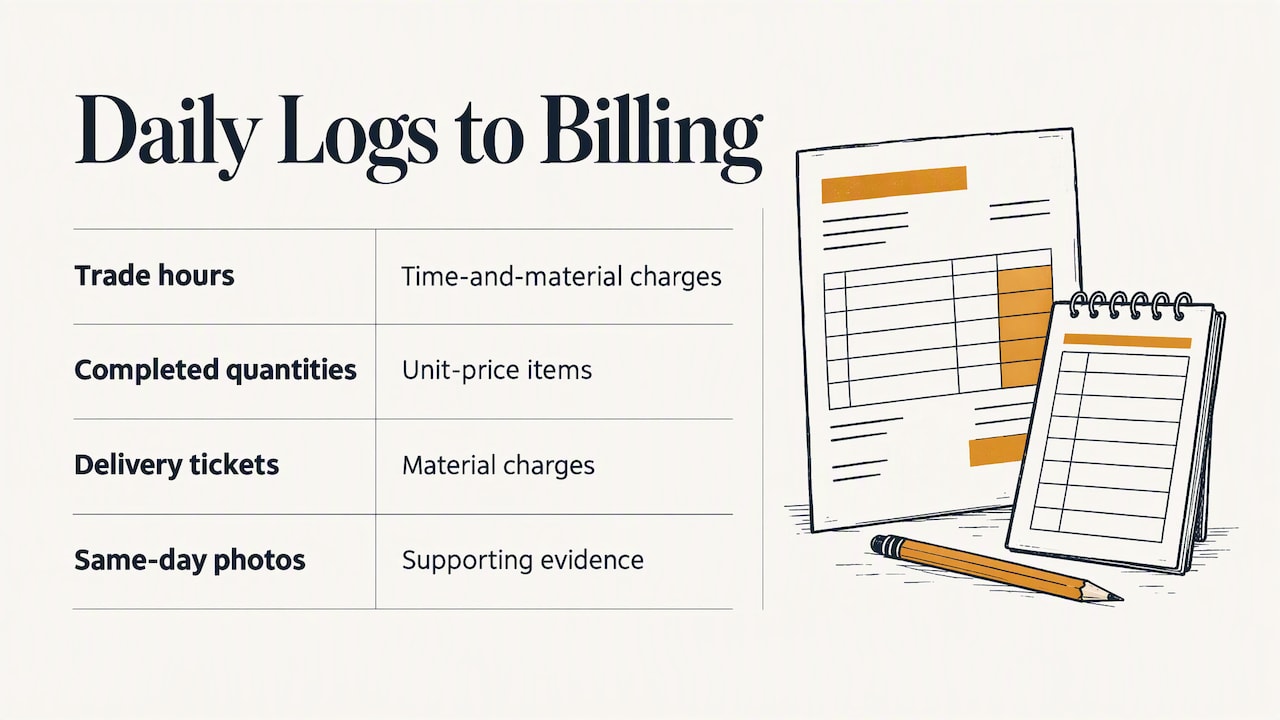
Next, reconcile weekly. Compare the week’s logs against payroll and subcontractor hours before invoicing, and fix mismatches while people still remember the day. Where certified payroll applies, this is also your check against Form WH-347.
Finally, record change-related work as it happens. If the client directs extra work, note the time, who directed it, and the crew and materials used. That entry turns a later change-order argument into a documented request. A tight invoice also reduces rejections, and this invoice checklist for contractors covers what clients look for. For the books side, see how field capture supports contractor bookkeeping.
How daily logs drive project management and progress tracking
Logs are more than protection. Read together, they show how the job is really moving, which is something a schedule alone cannot do.
Quantities and locations tell you actual production rates. If the log shows less work completed than the schedule assumed, you can adjust the next pour or add a crew before the gap widens. Because entries name areas and gridlines, you can see which zones are done and which are stalled.
Delay entries reveal patterns. Repeated late deliveries from one supplier, or repeated idle equipment waiting on inspections, show up quickly when the reasons are recorded with times. That lets you fix the cause instead of absorbing the loss.
Labor and equipment entries show where hours go. Compare planned crew size with actual headcount, and you will spot overstaffed tasks and short-handed ones.
Logs also keep meetings useful. Instead of debating what happened last week, the project team can open the record and focus on decisions. Progress reports to owners then become summaries of facts already captured. And because each log builds a running history of weather, labor, and output, you carry real numbers into your next estimate, not guesses.
Examples of using bilingual digital tools for fuller logs
Many crews work in English and Spanish on the same site, and a log written in only one language can leave out what half the crew saw. Bilingual tools close that gap.
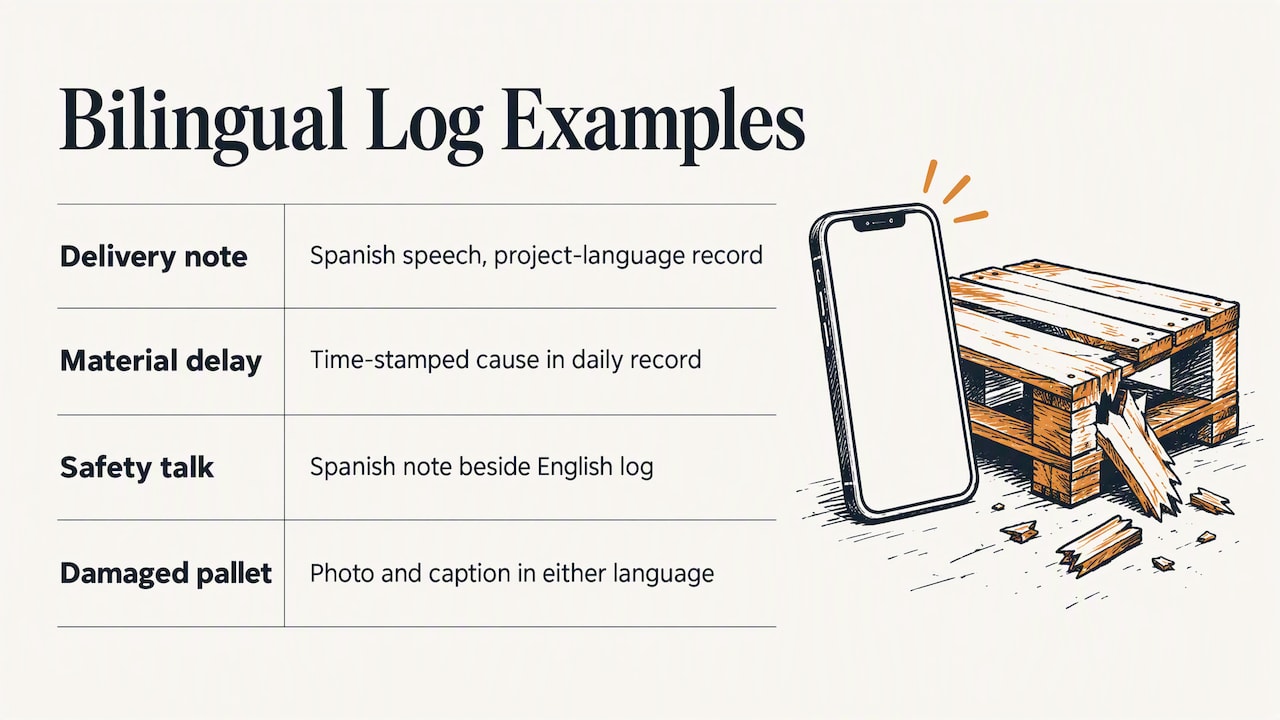
Consider a foreman who dictates a delivery note in Spanish while the superintendent reads logs in English. With a bilingual capture tool, the foreman speaks naturally and the record comes out in the language the project requires. Nothing is lost to a rushed translation at the end of the day.
Another example: a framing lead reports that a subcontractor’s crew left early because of a missing material delivery. He says it in the language he thinks fastest, and the entry still lands as a clear, time-stamped line in the daily record. The delay is documented with its cause, not remembered vaguely.
Safety talks work the same way. A short toolbox-talk note spoken in Spanish can be captured and filed beside the English log, giving you a complete account for both crews.
Photos add a language-neutral layer. A picture of a damaged pallet with a short spoken caption in either language carries the same evidence for everyone. If you need to find the right subcontractor for a trade or verify who was on site, a directory like PNV Leads’ subcontractor search can help you build and check your list.
A field note on capturing the day as it happens
In my view, the best log is the one finished while the day is still happening. Supervisors who capture facts as they go rarely have to argue about what occurred, because the record already says it. You do not need a new system to test this. This week, add one photo for every delivery and see how many questions it answers before anyone asks them. If it saves you one phone call, keep going.
— Francisco
How we help you capture the job without the paperwork
At Hechito, we built our tools around the workflow in this article. You speak and snap photos on site, and we turn them into organized records, quotes, and invoices without extra typing. We work in English and Spanish, so you or your crew can talk in either language and get clean documents back.
Our virtual coworkers cover the rest of the day: Chalán handles voice quotes and invoices from the job site, Lupita answers calls in two languages, and Godínez keeps bookkeeping matched to your jobs. See our contractor app, meet Chalán, or review the full crew lineup and pricing to learn more.
FAQ
What is a daily log in construction?
A daily log is the written record of what happened on a jobsite that day. It captures weather, labor, equipment, deliveries, work performed, and any delays or safety events. Its value comes from being completed at or near the time of the events.
What are some good daily log apps for construction?
Look for apps with time-stamped photos, voice capture, auto-filled fields, and a visible audit trail. Our Chalán assistant captures voice and photos on site and turns them into organized records. Check that any tool you choose supports your contract’s required fields.
How do I keep track of hours as a contractor?
Record hours by trade and by person in your daily log, with start and end times. Compare them against payroll weekly so mismatches are fixed while they are fresh. On federally funded projects, labor entries should reconcile with certified payroll.
What should be in a daily report?
Include the date, project, weather, labor by trade, equipment, material deliveries, work performed, and delays or safety events. Add photos and a signature. Your contract specification may list additional items, so check it first.
Sources
- Osha
- Pressbooks
- SECTION 013200 - CONSTRUCTION PROGRESS DOCUMENTATION
- OSHA Forms for Recording Work-Related Injuries and Illnesses
Recommended
This is the paperwork Hechito does for you — while you talk.