How Contractors Organize Receipts: A Job-Based System

How Contractors Organize Receipts: A Job-Based System

The best way for a contractor to organize receipts is to capture each one the moment you pay, tie it to a job, and review the pile once a week. A receipt that is photographed at the counter and coded to a job is never lost and never a January scramble. We built Hechito’s receipt handling around that habit: you snap the receipt, say which job it belongs to, and it is filed with the rest of the job’s records, in English or Spanish.
This guide walks through the system step by step, what the IRS expects you to keep and for how long, and where the usual routines break down.
Hechitohechito.comKeep Receipts With the Right JobHechito captures receipt photos and voice notes, helping contractors organize job records without adding more paperwork at the end of the day.VisitTL;DR
- Capture every receipt immediately, before it leaves your hand. Thermal paper fades and truck consoles swallow slips.
- Tag each receipt to a job, not only to an expense category. That is what makes job costing possible.
- Sort every purchase into direct job cost, overhead, or owner/other, and review weekly for ten minutes.
- Keep supporting records at least three years from filing, longer for payroll, assets and underreported income. Digital copies are acceptable.
- Hechito files receipts from voice and photos so the sorting happens on the job site, not at the kitchen table.
Table of Contents
- Why the shoebox fails
- Step 1: Capture the receipt the moment you pay
- Step 2: Tag every receipt to a job
- Step 3: Sort every purchase into three buckets
- Step 4: Store digital files so you can find them
- Step 5: Run a ten-minute weekly review
- What the IRS expects you to keep
- Common mistakes to avoid
- Our view: the receipt is a job record, not an expense record
- Put the system on autopilot with Hechito
- FAQ
- Sources
Why the shoebox fails
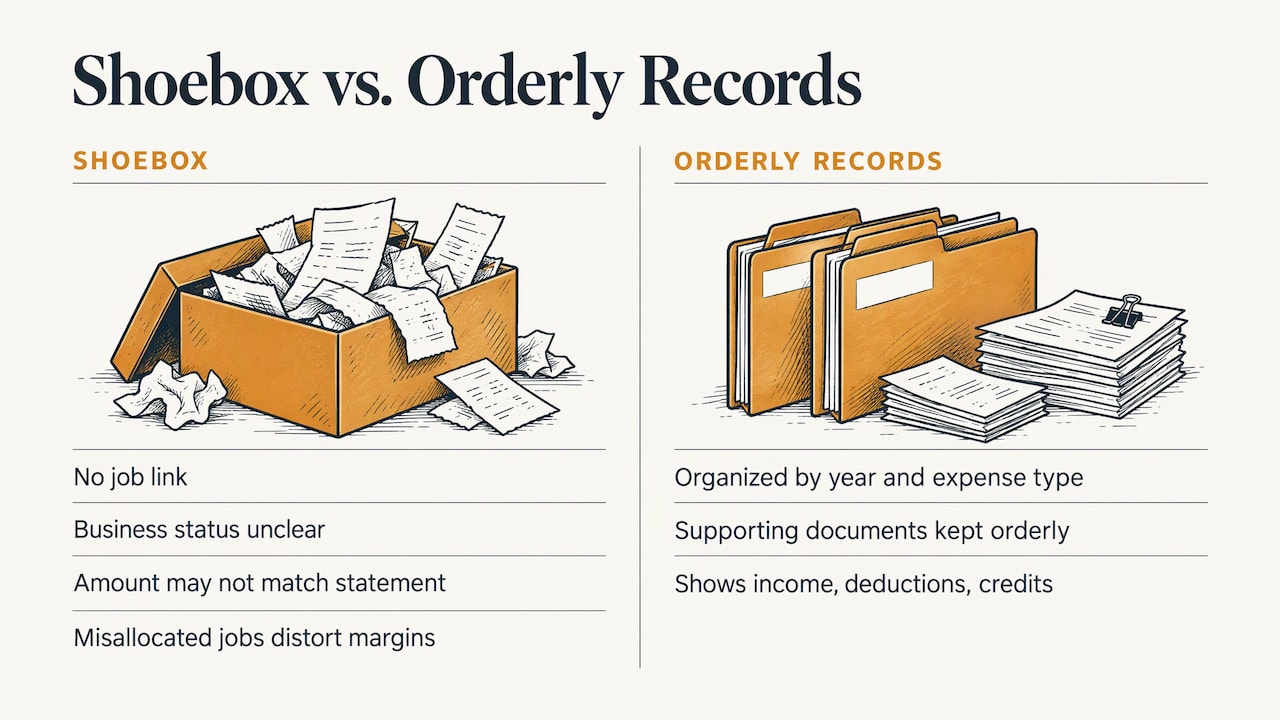
A bag or box of receipts is not a system. It holds the paper, but nothing says which job a purchase belonged to, whether it was a business expense, or whether the amount matches the card statement. Someone has to rebuild all of that later, usually your accountant, usually at a rate you pay for.
The IRS says a small business’s recordkeeping system should show gross income, deductions and credits in its books, with supporting documents such as sales slips, paid bills, invoices, receipts, deposit slips and canceled checks kept in an orderly fashion, organized by year and type of income or expense. “Orderly” is the key word. A card statement alone tells you that money moved, not what you bought or for which job.
The second cost is margin. If a hardware-store run for three jobs is coded to one job, that job looks unprofitable and the other two look better than they are. You then price the next bid on bad numbers. Our piece on job costing for contractors goes deeper on that link between field data and real margins.
Step 1: Capture the receipt the moment you pay
Everything else depends on this step. Photograph the receipt at the register or the supply-house counter, before you walk back to the truck. A system a contractor will follow is one that takes seconds, because a habit that takes ten minutes gets skipped on a busy day.
What a usable photo needs:
- The whole receipt, edge to edge, flat, in good light.
- Legible vendor name, date, total and the line items. Line items matter because the IRS wants to see what was bought, not just that you spent money.
- Taken the same day. Thermal receipt paper fades quickly, so the printed original is the weakest copy you will ever have.
Where it goes wrong: the plan to “do them all tonight.” Tonight you are tired, the receipts are in four pockets and two trucks, and the one from the lumberyard is already blank.
Where Hechito takes work off your hands: you take the photo and say a few words about the purchase. Voice and images are captured on the spot and turned into an organized record, so there is no typing in the parking lot. If your crew is more comfortable in Spanish, they can speak Spanish, and the records come out in the language each document needs.
Step 2: Tag every receipt to a job
Categories like “materials” or “fuel” help at tax time. Job tags help you run the business. A receipt tagged only “materials” tells you what you spent. A receipt tagged to the Alvarez bathroom tells you what that bathroom cost.
For each receipt, record:
- Date, vendor and total. The basics, and the three things most often unreadable on a faded slip.
- Job. A job name or number. Pick one format and use it every time, for example the customer’s last name plus the street number.
- Category. One category per receipt, such as materials, tools, fuel, subcontractor, permit or dumpster.
- Business purpose. One short phrase, such as “tile and thinset for kitchen backsplash.”
- Payment method. Business card, personal card, cash. This is how you match the receipt to the statement later.
If one receipt covers several jobs, split it at the time of purchase. A hardware run for three jobs should be noted as three amounts, not left for someone to guess at weeks later. Our guide to a job-based receipt system shows how this looks in daily practice.
Step 3: Sort every purchase into three buckets
Not every receipt belongs inside a job’s cost. A simple three-bucket sort keeps your numbers honest. One bookkeeping toolkit for contractors describes it this way:
| Bucket | What goes in it | Example |
|---|---|---|
| Direct | Costs tied to one job | Lumber and fasteners for one deck |
| Overhead | The cost of being open, spread across jobs | Insurance, shop rent, office software |
| Special | Items that look like job costs but are not | Owner draws, equipment purchases, tax payments |
Overhead should be allocated across jobs as a percentage, not buried in one job’s direct cost. Equipment is the one people miss: a new compressor is not a cost of the kitchen you bought it during. It is an asset with its own rules for depreciation.
If you buy the odd personal item on the business card, mark it at once. Mixed personal and business spending is the fastest way to turn a clean ledger into a long afternoon with your accountant.
Step 4: Store digital files so you can find them
Whether you use cloud folders or a platform, structure by job first. A common layout is one folder per job, named with the job number and customer, with subfolders for contracts, vendor invoices, receipts and purchases, subcontractor documents and permits. Contractor bookkeepers recommend keeping vendor invoices separate from point-of-sale receipts and attaching backup documents to the matching bill, check or card charge in your accounting software.
Three rules keep this from decaying:
- One home. Every receipt goes to the same place. Two inboxes and a camera roll is how things vanish.
- Consistent names. Date, vendor, amount and job code in the file name. “IMG_4417” is not findable.
- A backup. Cloud storage plus one other copy. A phone dropped off a ladder should not take your records with it.
If your books are handled by an outside bookkeeper, ask what format and folder structure they want before you start. Good bookkeeping for roofing companies and other trades is built on the same idea: clean inputs from the field, reconciled regularly, rather than a year-end cleanup.
Hechito’s bookkeeping virtual co-worker handles receipts and bank reconciliation, so the receipt you photographed in the field is already organized when the statement arrives. See how that fits with coding jobs from field capture.
Step 5: Run a ten-minute weekly review
The weekly review is what keeps the system honest. Pick a fixed time, such as Friday at the end of the day, and check:
- Every card and bank charge from the week has a matching receipt.
- Every receipt has a job and a category.
- Anything unclear is flagged while you can still remember the purchase.
- Receipts for materials that were returned or credited are marked.
Ten minutes a week beats ten hours of searching through truck consoles in January. It also shows you problems early, such as a job whose material costs are running ahead of the estimate while you can still do something about it.
What the IRS expects you to keep
This section is general information for US contractors, not tax advice. Your accountant or a tax professional should confirm what applies to your situation.
Do you need a receipt for every purchase?
The safe habit is yes. The IRS rule people call the “$75 rule” is narrower than it sounds. IRS Publication 463 covers travel, gift and car expenses, and says documentary evidence is not required for an expense of less than $75 other than lodging. You still need a record of the amount, date, place and business purpose. It does not cover materials, tools and supplies in general. For business expenses overall, IRS Publication 583 is the guide on keeping supporting documents that show what you paid and that it was a business expense. Photographing everything is easier than remembering which receipts are exempt.
How long to keep records
The retention period depends on the record. A 2026 tax-records guide from university extension authors, hosted on a USDA site, summarizes the main points:
| Record | Typical retention |
|---|---|
| Income tax records | Generally 3 to 7 years, depending on the situation |
| Return never filed or fraudulent | Indefinitely |
| Property and fixed-asset records | 3 years after disposal |
| Employee tax records | 4 years after the tax is due or paid, whichever is later |
The same guide suggests keeping financial records for at least 7 years as a conservative practice. The three-year clock generally runs from the date you file, not from the tax year, so a return filed in April 2027 stays open into 2030. For payroll paperwork, see these essential payroll records small businesses maintain.
Digital copies are fine in principle: IRS guidance allows electronic recordkeeping systems as long as they are accurate, legible and retrievable. A clear photo stored in an organized folder does the job, and it will outlast a faded original.
Common mistakes to avoid
- Waiting to batch. The longer a receipt sits, the more likely the details are forgotten or the ink is gone.
- Tagging only by category. You get a tax summary but no job profit.
- Skipping crew purchases. Employees buying a part on a company card should photograph the receipt and name the job the same day.
- Mixing personal and business. Separate cards make the weekly review quick.
- No reconciliation. Receipts that are never matched to the bank feed hide duplicates, missing slips and errors.
- Paper as the master copy. Treat the photo as the record and the paper as the backup.
Our view: the receipt is a job record, not an expense record
Most contractors we talk to do not have a discipline problem. They have a timing problem. The receipt is created at the register, the job is known in your head at that moment, and by evening both are gone.
That is why we built Hechito around capture in the moment. You say what the purchase was for, you snap the photo, and the record is organized without extra typing. A tool that only stores what you type later asks you to do the work twice.
We also think the language of the crew should not be a barrier to good records. Hechito works in English and Spanish, and you can speak either or both while the documents come out in the language they need.
Receipts are only the start. The same field capture feeds your estimates, invoices and payment follow-up, so what you record once at the supply house shows up where it matters: in the job’s real cost.
Francisco
Put the system on autopilot with Hechito
Hechito is built for contractors and tradespeople who are tired of paperwork at the end of the day. You talk and take photos on the job, and the records are organized for you, from receipts to quotes to invoices. Our virtual co-workers cover field, phone and bookkeeping tasks, including receipts and bank reconciliation. Meet them on the Chalán, Lupita and Godínez page, or see how Hechito works.

Once receipts are captured and coded, the rest of the paperwork gets easier too. Clean job costs feed better profit margin pricing, and organized records support the daily construction logs you rely on for payroll and claims.
FAQ
What is the best way to organize receipts as a contractor?
Capture each receipt as a photo the moment you pay, tag it with the job, category and purpose, and store it in one place organized by job. Then review weekly. The system only works if it takes seconds per receipt, so choose a method that fits how you actually work.
What is the $75 rule for receipts?
IRS Publication 463 says documentary evidence is not required for certain travel, gift and transportation expenses under $75, other than lodging. You still need to record the amount, date, place and business purpose. It is not a general exemption for materials or supplies, so keeping every receipt is the simpler habit.
How long should contractors keep receipts?
Generally at least three years from the date you file the return, longer in some cases. Employment tax records need four years, asset records last until three years after disposal, and records for an unfiled or fraudulent return are kept indefinitely. Ask your accountant what fits your business.
Can I keep digital copies instead of paper?
Yes, as long as the images are accurate, legible and easy to retrieve. Photograph the full receipt, name the file clearly, store it by job, and keep a backup copy in a second location.
Sources
- IRS: What kind of records should I keep
- IRS Publication 463
- IRS Publication 583
- Demystifying Tax Records (2026)
- Receipt Organization Toolkit
- How contractors should organize digital receipts and job documents
Recommended
This is the paperwork Hechito does for you — while you talk.