Receipt Management for Contractors: A Job-Based System

Receipt Management for Contractors: A Job-Based System

Good receipt management for a contractor comes down to four habits: photograph every receipt the moment you pay, tie it to a job, reconcile it against your card or account statement every week, and keep the records for as long as the IRS can still look at the return. Do those four things and the bag of crumpled paper in the truck stops being a tax-season problem. This guide walks through a system that works for a solo tradesperson or a crew of ten, with the IRS rules that sit behind it.
HechitoKeep Job Details TogetherHechito captures job details through voice and images, helping contractors reduce paperwork while organizing records from quoting through invoicing.Visit HechitoTL;DR
- Photograph each receipt before it leaves the supply house, and tag the job at the same time.
- Reconcile receipts against card and account statements weekly, not at year end.
- The IRS generally expects documentary evidence for business expenses of $75 or more, and you need to keep records until the limitations period for the return runs out.
- If a receipt is lost, rebuild it right away from the date, vendor, amount, payment method and what you bought, backed by a statement.
- Voice and photo capture on the job site removes the typing that makes most receipt systems fail.
Table of Contents
- Why receipts matter more for contractors than for most businesses
- What the IRS expects you to keep
- A receipt system that survives a busy week
- Tying receipts to jobs and cost codes
- A simple setup by crew size
- What to do when a receipt is missing, faded or late
- How long to keep receipts
- Perspective: the paperwork should happen where the work happens
- Where Hechito fits
- Connecting receipts to getting paid
- A 15-minute weekly routine
- FAQ
- Sources
Why receipts matter more for contractors than for most businesses
A contractor’s receipts do two jobs at once. They support your tax deductions, and they tell you what each job really cost. Lose the first and a legitimate expense can be denied. Lose the second and you quote the next job on guesses.
The tax side is straightforward. A bookkeeping firm that works with construction and trades businesses puts it plainly: without receipts, even legitimate expenses can be denied, and you may then owe tax plus penalties and interest. The IRS describes the structure it expects in Publication 583: summary records in your books, such as journals and ledgers, plus supporting documents that back up the entries on your return.
The job-cost side is where contractors feel it daily. Contractors buy small, often: a box of fasteners at 6:40 a.m., a fitting at lunch, a rental on the way home. Spread across three jobs and two trucks, those purchases are exactly the ones that go missing. If they are never coded to a job, your margin on each job looks better than it is.
What the IRS expects you to keep
Publication 583 lists the kinds of supporting documents that show what you paid and that it was for business: canceled checks, cash register tapes, account statements, credit card sales slips, invoices and petty cash slips. A receipt is the best of these because it shows the vendor, the date and the items in one place.
On the question of when a receipt is strictly required, the IRS says in Publication 463 that you must generally have documentary evidence such as receipts, canceled checks or bills, with an exception for expenses other than lodging that are under $75. That publication covers travel, gift and car expenses, so check it for those categories. For a contractor, the practical reading is simple: do not build a system around which receipts you think you can skip. Capturing a $6 receipt costs five seconds. Deciding later which ones mattered costs far more.
Two more points from Publication 583 are worth knowing:
- Your business records must be available at all times for inspection by the IRS.
- If the IRS examines your return, you may be asked to explain items on it, and a complete set of records speeds the examination.
For tax questions specific to your situation, such as how a particular expense is classified, talk to your CPA or enrolled agent.
A receipt system that survives a busy week
The best system is the one your crew actually uses at 4:30 on a Friday. That means few steps, no typing at the counter and one rule for where things go. A field guide from a construction accounting firm lays out a four-step workflow that fits that description, and it is the backbone of what follows:
- Assign the job and cost code at purchase, when you can.
- Photograph the receipt before it leaves the supply house.
- Sync or upload within 48 hours, so someone can confirm the job and cost code.
- Reconcile weekly against the supplier card or account statement, flagging anything without a receipt photo.
The source of this workflow, Level Accounting Firm’s material tracking guide, also points out why the 48-hour window matters: crews start forgetting which job a receipt belonged to once it is older than that.
Step 1: Decide the job before you pay
The cheapest moment to code a receipt is before the purchase. If you know you are buying drywall screws for the Alvarez bathroom, say so then. A receipt tied to a job on the spot never becomes a mystery later.
For trade-account purchases, ask the counter to put the job name or PO field on the ticket. For card purchases, use one of two habits: write the job on the receipt in marker, or say it aloud into your capture tool as you photograph the slip.
Step 2: Photograph it before it leaves the building
Thermal paper fades. Receipts go through washers, get left on dashboards and end up under a drill case. Take the photo at the counter or at the tailgate. Get the whole slip in frame, with the vendor name, date, line items and total readable.

If a purchase has more than one job’s materials on it, photograph it once and note the split. A one-line comment, such as “half to Maple St, half to Oak Ave,” is enough for the office to allocate it correctly.
Step 3: Get it into one place within 48 hours
Photos in a camera roll are not a system. They need to land in a shared place that the person doing your books can see. Pick one destination, whether that is a shared folder per job or an app that files them for you, and send everything there.
A bookkeeping source on job costing makes the same point about timing: upload receipts to the job folder weekly rather than saving them up, because receipts lose context quickly and waiting guarantees miscodes.
Step 4: Reconcile every week
The weekly check is what turns a pile of photos into reliable books. Once a week, ideally the same day, compare your card and account statements to the receipts you captured. Anything on the statement without a receipt photo gets chased while the purchase is still fresh. The field guide above suggests doing it every Friday.
A Friday review also catches duplicates, personal charges on a business card and purchases that landed on the wrong job. Fifteen minutes weekly beats a full weekend in March.
Tying receipts to jobs and cost codes
A receipt filed by date is a receipt you cannot use for estimating. A receipt filed by job and category is data.
You do not need a complicated chart of codes. Most small contractors do well with a short list: materials, subcontractors, equipment rental, fuel and vehicle, permits and fees, disposal, and tools under a set amount. Add a code only when you actually want to see that number separately.
Two principles from the research on job costing help here:
- Code consistently. Fine Homebuilding’s piece on cost codes notes that using the same codes for estimated and actual costs keeps the bookkeeping tidy and makes the data more useful for future estimating.
- Agree on who codes what, in advance. The same article explains that material receipts and trade-partner invoices are often coded by the project manager who knows the estimate best, though a site lead or bookkeeper may also take part. Settling the protocol for turning in and coding receipts ahead of time helps make sure clients are invoiced accurately and that change-order costs are not missed.
An advisor on contractor finances adds a useful test: coding should be verification, not interpretation. If the job number and cost code are not clearly on the document, it sits uncoded, gets miscoded or is posted late, and your job-cost reports drift from reality.
If you want to go deeper on what happens after the receipt is coded, our guide to job costing for contractors shows how field data feeds your work-in-progress numbers, and bookkeeping for contractors using field capture covers coding jobs the same day.
A simple setup by crew size
| Situation | What to do | Who does it |
|---|---|---|
| Solo contractor | Photograph at purchase, say the job aloud, review Friday | You |
| Small crew, 2 to 5 | One shared destination, job named at purchase, weekly statement check | Each worker captures, one person reconciles |
| Multiple crews and trucks | Company card per lead, job or PO on supplier tickets, weekly review by office | Leads capture, office or bookkeeper codes and reconciles |
Notice what stays constant: capture happens in the field by the person who bought the item, and review happens once a week by one person. The rest is detail.
What to do when a receipt is missing, faded or late
It will happen. A receipt blows out of the truck bed, or a helper pays cash and forgets to ask for the slip. The answer is to document the gap right away instead of hoping the paper turns up.
An accounting firm that writes on this topic recommends using a missing receipt form, and at a minimum recording the date of purchase, method of payment, vendor, amount and what was bought, with optional fields such as expense coding or class. Store that form where the original receipt would have gone.
Then back it up with whatever corroborates it. The IRS lists account statements, canceled checks and credit card sales slips among the supporting documents for expenses, so a card statement line that matches your form is real evidence. Add a note of the job and the business purpose while it is fresh.
A few practical rules:
- Rebuild the record the same week, not at tax time.
- Pay supplier and large purchases by card or check, so a statement exists even if the slip does not.
- Ask the vendor for a duplicate. Most supply houses can reprint a ticket from the account.
- If a missing receipt covers a large or unusual expense, ask your CPA how to document it before you file.
How long to keep receipts
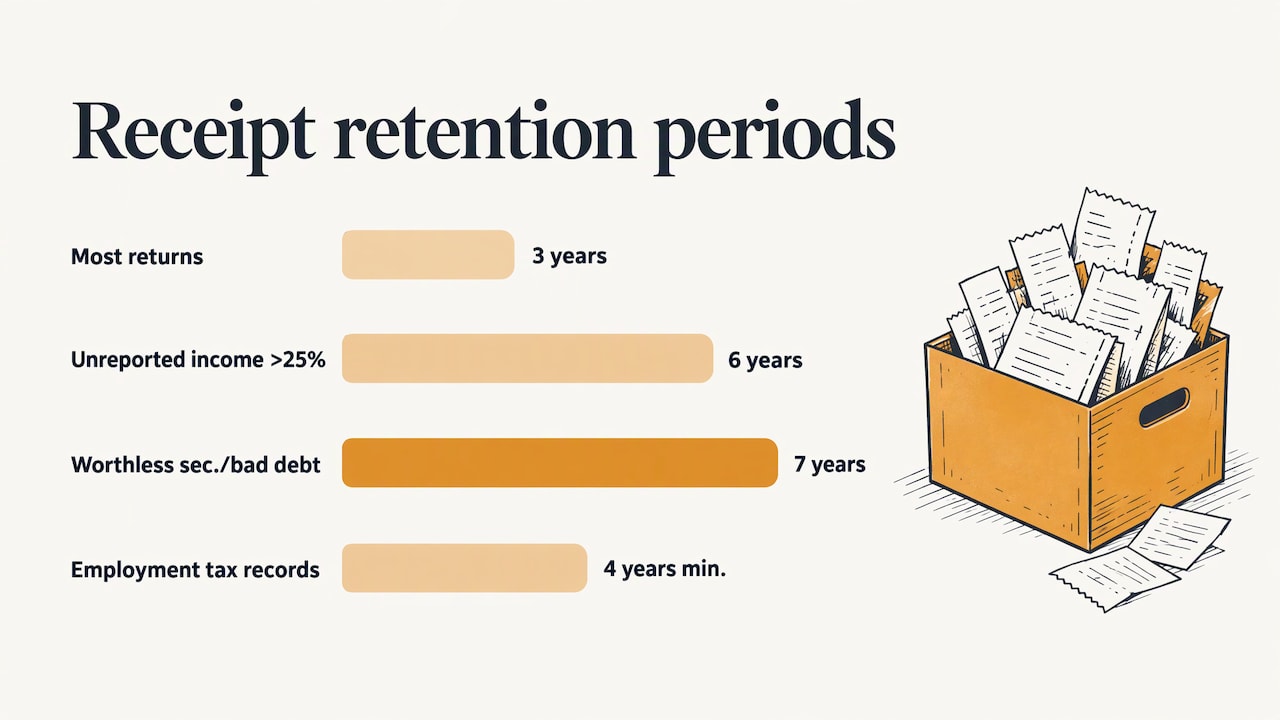
The IRS ties retention to the statute of limitations. Publication 583 says you must keep records as long as they may be needed for the administration of the Internal Revenue Code, which generally means until the period of limitations for the return runs out. Its Table 3 gives these periods:
| Situation | Keep records for |
|---|---|
| Most returns, where none of the below applies | 3 years |
| You did not report income that is more than 25% of the gross income shown on the return | 6 years |
| You file a claim for a loss from worthless securities or bad debt deduction | 7 years |
The same publication says employment tax records should be kept at least 4 years after the tax becomes due or is paid, whichever is later. If you have employees, that affects payroll-related receipts and filings too. State and local rules, bonding requirements and contract terms can ask for longer, so check them, and ask your CPA about anything you are unsure of.
Because photographed receipts take no physical space, the easiest policy is to keep digital copies of everything, organized by year and job, and not purge until you are well past the longest period that could apply to you. Back them up somewhere other than your phone.
Contractors who also run an entity north of the border face a separate set of record and filing rules; the federal corporation annual return checklist for Canada is a reasonable starting point for what to keep on that side.
Perspective: the paperwork should happen where the work happens
We built Hechito around a simple observation: tradespeople do not lose receipts because they are careless. They lose them because the system asks them to stop working and type.
Most apps record what you tell them. They still leave you with the filing, the coding and the end-of-day catch-up. Our view is that capture should be the whole job for the person in the field. You talk, you snap a photo, and the record organizes itself around the job it belongs to.
That is also why we work in English and Spanish. Many crews switch between the two in the same conversation, and the paperwork should not care. You speak the way you speak, and the documents come out clean in the language the customer or the office needs.
Receipts are only one piece. When purchases, photos and job notes live together, quotes get faster, invoices go out sooner and payments come back faster. That is the goal: fewer evenings spent on paperwork, and no detail left behind.
Francisco
Where Hechito fits
If you want the capture step to be as light as possible, Hechito is designed for it. Our platform captures voice and photo inputs on the job, organizes the documentation, manages receipts and bank reconciliation, and carries the work through to estimates and invoices. It runs in English and Spanish.
You can see how the flow works on the how Hechito works page, or look at the virtual co-worker options, including a bookkeeping assistant, on the Hechito crew page.

For contractors who want estimating, invoicing and receipts in one place, the invoicing and estimate app for contractors page is the place to start.
Connecting receipts to getting paid
Receipt management is not only a tax task. Material costs you can prove are material costs you can bill. When a change order adds an unplanned purchase, a coded receipt gives you the number to put on the invoice, and a job photo gives you the proof.
That is why the same records matter again downstream. Our guides on the estimate to invoice workflow and on photo documentation in construction show how field records support billing. If your issue is slow payment, the cash flow in construction article and our plan for overdue invoice collection pick up where your receipts leave off.
A 15-minute weekly routine
Pick a fixed time, such as Friday at 3:00 p.m., and run the same checklist:
- Open this week’s card and account statements.
- Match each charge to a receipt photo. Mark the ones with none.
- Confirm each receipt has a job and a category.
- Chase or rebuild every missing receipt using the date, vendor, amount, payment method and items.
- Flag anything personal, duplicated or on the wrong job.
- Skim the job-cost report for anything that looks off compared with the estimate.
The last step is the one that pays off. As the Fine Homebuilding article notes, regular job-cost reviews help you anticipate issues and catch missed or miscategorized expenses.
FAQ
Do I need to keep a receipt for every business purchase?
The IRS generally requires documentary evidence for expenses, with an exception for non-lodging expenses under $75, as described in Publication 463. In practice, capturing all receipts is simpler and gives you cleaner job costs. Ask your CPA about your specific categories.
Is a photo of a receipt good enough?
A clear photo that shows the vendor, date, items and total is the standard way most contractors keep receipts today. Keep the image organized and backed up, and make sure you can pull it up by job and date. For your own situation, confirm with your tax professional.
How long do I keep contractor receipts?
Generally until the period of limitations for the return runs out, which is usually 3 years, longer in some cases, per IRS Publication 583. Employment tax records need at least 4 years. Keeping everything digitally for longer costs almost nothing.
What if my crew pays with cash and forgets the receipt?
Fill out a missing receipt record the same day with date, vendor, amount, payment method and what was bought, and tag the job. Prefer company cards or accounts for crew purchases so a statement exists as backup.
Sources
- IRS Publication 583, Starting a Business and Keeping Records
- IRS Publication 463, Travel, Gift, and Car Expenses
- Why Receipt Management Is Crucial for Construction and Trades Businesses
- Tracking Material Costs in Construction: A Field Guide
- Use Cost Codes to Track Construction Project Costs, Fine Homebuilding
- Why Inconsistent Project Folders Break Job Costing
- How to Handle Missing Receipts
- Federal Corporation Annual Return: Deadlines and Filing Checklist
Recommended
This is the paperwork Hechito does for you — while you talk.

On iPhone? Coming very soon to the App Store.