Payment Reminder Emails for Contractors: Timing, Wording, Templates

Payment Reminder Emails for Contractors: Timing, Wording, Templates

A good payment reminder email is short, names the invoice number, amount and due date, links to a way to pay, and gets firmer only as the invoice ages. Send the first one a few days before the due date, the next on the due date, then follow up at roughly one week, two weeks and thirty days late. Below you’ll find that schedule, the wording for each step, and the point where emails stop and paperwork starts.
This guide is written for contractors and tradespeople, not office teams with an accounts receivable department. You are probably on a roof or under a sink when the money is due, so everything here is built to be quick to send, or to send itself.
HechitoSpend Less Time on Invoice AdminHechito turns job details captured through voice and images into organized records, helping contractors move from quoting to invoicing with less paperwork.Visit HechitoTL;DR
- Send five touches: before the due date, on the due date, and after it at about 7, 14 and 30 days. Start friendly and assume an oversight.
- Put the invoice number, amount, due date and a pay link in every email. Put the invoice number in the subject line.
- Automate the early reminders. Take over personally once an invoice is 14 or more days late.
- On construction jobs, deadlines for liens, bonds and notices can run out while you keep sending polite emails. Check them early, and talk to a construction attorney before an invoice is seriously overdue.
- Keep a file: contract, scope, photos, and every email. It protects you if the reminders fail.
Table of Contents
- Why contractors get paid late (and why a reminder is not rude)
- When to send each reminder: a schedule you can follow
- What every payment reminder email must include
- Tone: friendly first, firm later
- Copy-ready templates for each stage
- Tailoring the message to who owes you
- Is a payment reminder email legal to send?
- Perspective: the reminder is the easy part
- Automating reminders without losing the personal touch
- Where Hechito fits
- When emails stop working: protect your payment rights
- Preventing late payments before they start
- FAQ
- Sources
Why contractors get paid late (and why a reminder is not rude)
Most late payments are not refusals. The invoice sat in a spam folder, the homeowner forgot, the office manager is waiting on an approval, or the client simply has no idea a due date passed. A reminder fixes all of that at almost no cost to the relationship, as long as the tone matches the situation.
The bigger problem for tradespeople is timing on your side. Invoices go out late because the paperwork waits until evening. Reminders go out later still, or never, because chasing money feels awkward. Every day of delay between finishing the work and sending the invoice is a day added to your cash cycle before the client’s clock even starts. If your invoices themselves are the issue, start with our invoice checklist on contractor payment terms, because clear terms make every reminder easier to write.
When to send each reminder: a schedule you can follow
There is no law that sets the perfect rhythm, so treat this as a working schedule that many small businesses use and adjust it to your contract terms. What matters is that the cadence is decided in advance, so you are never deciding in the moment whether to “bother” a client.
| Touch | When | Tone | Goal |
|---|---|---|---|
| 1. Heads-up | 3 to 7 days before due | Friendly, service-minded | Confirm the invoice arrived and the client can pay |
| 2. Due-date nudge | On the due date | Neutral | Make paying one click |
| 3. First overdue | 1 to 7 days late | Polite, assumes an oversight | Surface a lost invoice or a simple delay |
| 4. Second overdue | 7 to 14 days late | Direct, professional | Get a payment date in writing |
| 5. Final email notice | 30 or more days late | Firm, factual | State next steps and a deadline |
This mirrors the cadence that invoicing software makers describe: a pre-due reminder 3 to 7 days ahead, a due-day nudge, then overdue follow-ups at 1 to 7 days, 7 to 14 days and 30 plus days.
What time of day and week
Guidance on reminder emails suggests early in the business day, roughly 8 to 10 am, Tuesday through Thursday, rather than Monday or Friday. It’s a reasonable default for a commercial client. For a homeowner, try the evening, when they are looking at their phone. Test it on your own clients and keep what gets answered.
Counting from the right date
Overdue is counted from the due date on the invoice, not from the day the work finished. If your terms say “net 15” and you never wrote them down, the clock is blurry and the reminder is weaker. Put the due date in writing on the estimate, the contract and the invoice.
On federal construction work the rules are explicit. Under the government’s construction prompt payment clause, the due date is 14 days after the billing office receives a proper payment request. Private jobs follow your contract and your state’s law, so read both.
What every payment reminder email must include
Across all five touches, the same few elements do the work:
- Invoice number in the subject line. It lets the client find the right document in seconds, and it keeps the thread searchable for you.
- Amount and due date. State both in the body, not just in an attachment.
- A way to pay. A pay link, or clear instructions for check, ACH or card. If paying takes three steps, you will wait three more days.
- The invoice itself. Attach it again or link to it. Assume the original was lost.
- Job reference. “Kitchen remodel, 14 Maple St.” reminds the client exactly what they are paying for.
- A human sign-off. Your name, your direct phone number, your company. A reply from a real person gets a real answer.
Keep it to a handful of sentences. A client reading on a phone should see the amount and the pay button without scrolling.
Tone: friendly first, firm later
The tone of reminders should shift as the invoice ages: start service-oriented and assume an oversight, then become firmer and more formal, mentioning late fees or service suspension only for seriously overdue accounts.
Two practical rules follow from that:
- Never mention a late fee unless it is in your signed terms. A threat you cannot back up costs you credibility.
- Never accuse. “I may have missed your payment” lands better than “you haven’t paid.” You can be exact about the facts without being cold.
Copy-ready templates for each stage
Swap in your details. Each template is deliberately short.
1. Heads-up, 3 to 7 days before due
Subject: Invoice #1042 for the bathroom remodel, due June 12
Hi Dana,
Just a quick note that invoice #1042 for $3,850.00 is due on June 12. You can pay online here: [pay link]. The invoice is attached in case it’s easier to find.
If anything looks off, call or text me at 555-0142 and I’ll sort it out right away.
Thanks again for trusting us with the job.
Marcus, Alvarez Plumbing
2. Due-date nudge
Subject: Invoice #1042 is due today
Hi Dana,
A friendly reminder that invoice #1042 ($3,850.00) is due today. Here’s the link to pay: [pay link].
Thank you, Marcus
3. First overdue, 1 to 7 days late
Subject: Invoice #1042 was due June 12
Hi Dana,
I don’t see payment yet for invoice #1042 ($3,850.00, due June 12). It may have crossed in the mail or slipped past, so I’ve attached a copy and the pay link: [pay link].
If you’ve already sent it, thank you, and please ignore this note.
Marcus
4. Second overdue, 7 to 14 days late
Subject: Second notice: invoice #1042, $3,850.00
Hi Dana,
Invoice #1042 for the bathroom remodel is now 10 days past due. Can you let me know by Friday when I can expect payment? If there is a question about the work or the amount, I’d like to resolve it this week.
Pay link: [pay link]. My direct line is 555-0142.
Marcus
5. Final email notice, 30 or more days late
Subject: Final notice: invoice #1042, 30 days past due
Dana,
Invoice #1042 ($3,850.00) is now 30 days past due. Please pay in full by June 28 using this link: [pay link], or call me today to arrange a payment plan.
If I don’t hear from you by then, I will have to move to the next steps allowed under our agreement, which may include [late fee per section 4 / lien rights / collections]. I would much rather settle this directly.
Marcus
Fill the bracket only with remedies your contract and state law actually allow. That is where a quick call to an attorney is worth the fee.
Tailoring the message to who owes you
Homeowners. Warm and simple. Mention the finished work, avoid jargon, and make paying by card or bank link easy. A phone call after touch three often resolves it.
General contractors or property managers. They run on process. Ask directly: “Has this been approved? What is the pay run date?” Often the invoice is stuck in a queue, not ignored. Your progress billing needs to line up with their draw schedule, which we cover in our guides to progress billing for construction and payment schedules and draws verified with field photos.
Spanish-speaking clients. If your customer is more comfortable in Spanish, a reminder in English can sit unanswered. Sending it in their language is a courtesy that also gets money moving.
Is a payment reminder email legal to send?
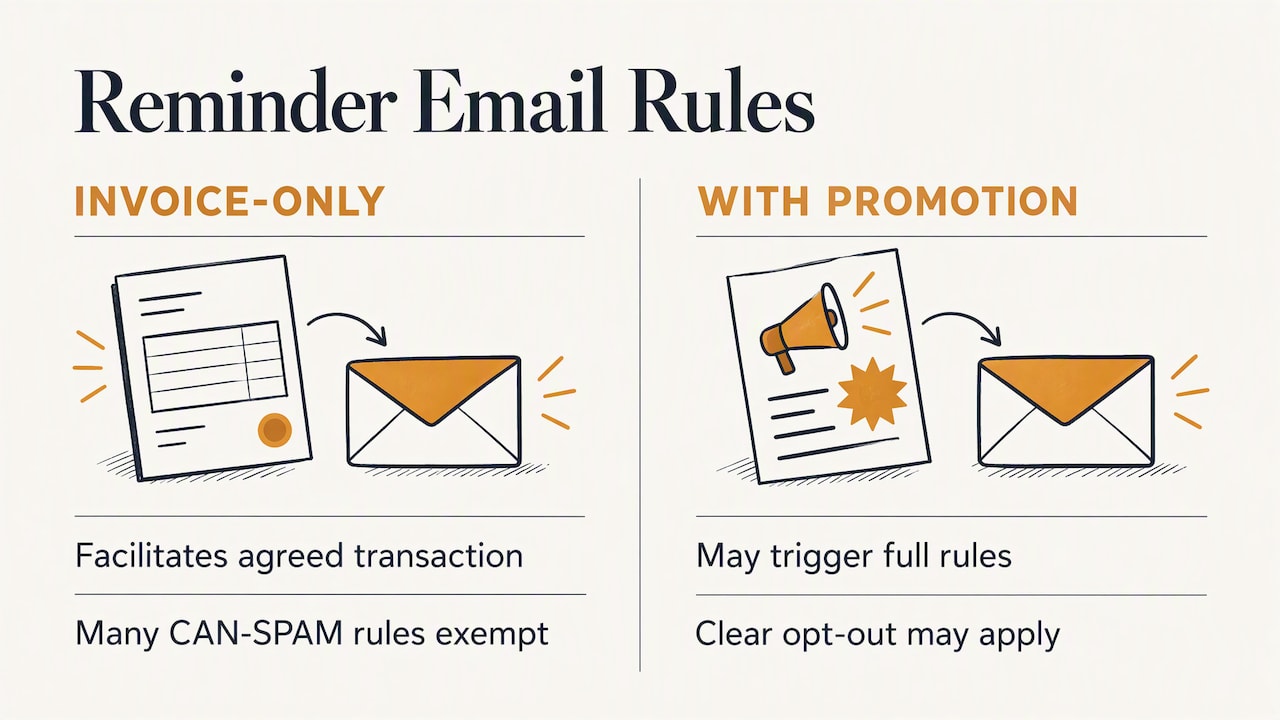
Yes, and for a straightforward invoice reminder the compliance burden is light. The FTC’s guidance says that most automated payment reminders count as transactional or relationship messages under CAN-SPAM, which exempts them from many commercial email requirements, provided they only facilitate an agreed transaction.
The catch: do not slip promotions into the reminder. If you add “Book our fall gutter special!” the message may no longer be purely transactional, and the full rules, including a clear opt-out, can apply. Keep reminders about the invoice. Selling comes in a separate email.
This is general information, not legal advice. If you are collecting from consumers after a debt is seriously delinquent, or sending to a collection agency, talk to a lawyer licensed in your state.
Perspective: the reminder is the easy part
We built Hechito for people who finish a job, climb into the truck, and still have an hour of paperwork waiting at home. From what we see, the reminder email is rarely where late payment begins. It begins earlier: a quote that was never written down, a change order agreed on the driveway, a photo that never got attached to the invoice.
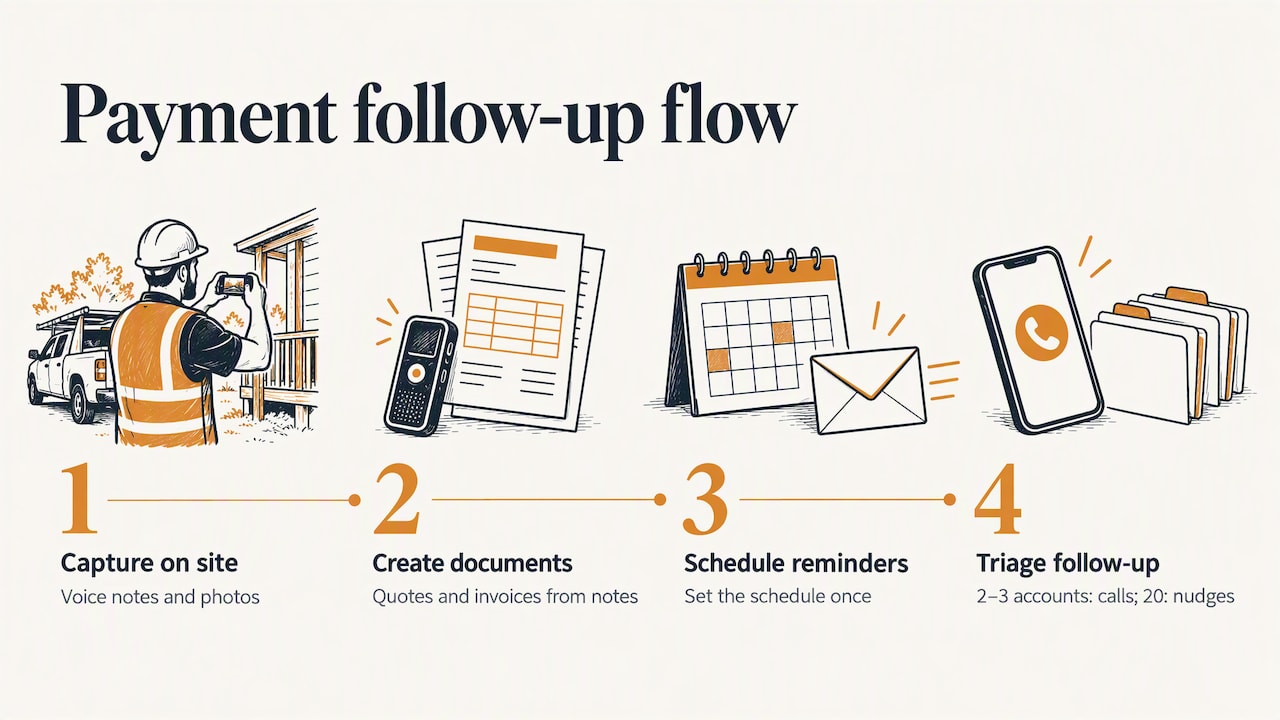
When the record is thin, the client has a reason to question the invoice, and no email tone can fix that. When the record is complete, with the scope, the photos and the conversation captured as the job happened, a reminder is a one-line message and the question never comes up. That is why we capture voice notes and photos on site and turn them into quotes and invoices, instead of asking you to type it all up at night.
The second thing we believe: reminders should not depend on your memory or your mood. Whatever tool you use, set the schedule once and let it run. Your energy should go to the two or three accounts that need a phone call, not the twenty that just needed a nudge.
— Francisco
Automating reminders without losing the personal touch
Automation makes sense for touches one through three: they are identical for nearly every client, and they are the ones you are most likely to skip. Look for these features in any invoice reminder tool, spreadsheet workflow or accounting package:
- Rules based on the due date, so reminders go out before and after it without you remembering.
- Your own wording, because a robotic subject line looks like spam and gets ignored.
- A pay link inside every message.
- A stop switch that halts reminders the moment payment lands, so nobody gets a nag after paying.
- An override: the ability to pause one client’s reminders when you are mid-conversation with them.
- A log showing what was sent and when, which matters if the invoice becomes a dispute.
Keep touches four and five manual or approved by you. Those messages shape whether the client stays a client, and they may become evidence later.
Where Hechito fits
Hechito is built around the work you already do on site. Chalán turns what you say and photograph on the job into quotes and invoices, so the document going out is accurate and fast. Payment follow-up is part of the same flow: the platform sends estimates and invoices and chases payments, so reminders do not depend on you remembering at the end of a long day. Because it works in English and Spanish, documents can go to a client in the language they need.
If you also want someone answering the phone or matching receipts to the bank, Lupita handles bilingual calls and Godínez handles bookkeeping that ties bank activity to your jobs. You can see how it works for your trade on the contractors page, and the pricing page lays out what each helper costs.
When emails stop working: protect your payment rights
This is the section most reminder guides skip, and for construction it matters most. Payment rights on construction work are deadline-driven, and lien, bond and prompt-payment rights should be preserved before invoices become seriously overdue. Polite emails do not stop those clocks.
Construction attorneys can help determine whether lien rights exist, which notices are required, when a claim must be filed and whether a payment bond applies, according to the same article. If you are a subcontractor or supplier, check your notice deadlines at the moment you send the first invoice, not at day 60.
Claim letters
When reminders fail, a formal claim letter may be the next step. Such a letter puts another project party on notice of your claim for payment, and contracts often require it within a set window after a dispute arises, commonly 21 to 30 days. Miss it, and you risk waiving your claim. Read your contract for who must receive the notice and how it must be delivered.
Pay-if-paid clauses
If you work under a general contractor, check for a pay-if-paid clause, which shifts the risk of owner nonpayment onto you. Courts in many places still limit how far a general contractor can lean on one, through the prevention doctrine, when the delay comes from the general contractor’s own failures. Whether it applies to you depends on your state and contract, so ask an attorney before you decide to write off or wait out a payment.
Build the file as you go
A documented file is your best leverage: the original contract, the scope, photos, field reports and every email, including each reminder. The IRS also expects you to keep records. Its guidance says supporting documents such as invoices, receipts, paid bills and canceled checks should be kept safe and accessible. Photos taken on site with timestamps, attached to the right job, make a dispute far shorter. Our posts on bookkeeping for contractors and job costing from field data show how to keep that file without extra evenings at the kitchen table.
Preventing late payments before they start
The best reminder is the one you never send. A few habits cut down on chasing:
- Send the invoice the same day the work is done, or the same day a milestone is hit.
- Spell out terms on the estimate. Disputes over what was promised are a common reason clients stall. See how to prevent estimate versus quote disputes.
- Bill in stages on larger jobs so no single invoice is huge.
- Ask for a deposit before you buy materials.
- Offer easy payment methods: card, bank transfer, and a pay link in every message.
- Confirm receipt of the invoice in the first reminder, so you know it reached a real inbox.
FAQ
How do you politely remind a client about payment in an email?
Keep it short and assume the client simply missed it. Name the invoice number, amount and due date, attach the invoice, add a pay link, and offer to help if something is unclear. Avoid words like “failure” or “demand” in the first two reminders.
When should I send the first reminder for an unpaid invoice?
A common approach is 3 to 7 days before the due date, with a second note on the due date. If it is already overdue, send a polite reminder within a day or two, then follow up around the one-week and two-week marks. Match this to the terms in your contract.
How many reminders should I send before taking further action?
Five emails over about 30 days is a sensible limit: before due, due date, and three overdue notices. Add a phone call after the second overdue email. After that, move to the steps your contract allows, and check lien and notice deadlines early with a construction attorney.
Can I charge a late fee in a reminder email?
Only if the fee is in your signed agreement or invoice terms and permitted by your state’s law. Mention it in the later, firmer emails and quote the clause. If it was never agreed, do not add it in a reminder.
Should reminders be automated?
Automate the early, routine ones, since they are the same for every client and easy to forget. Handle the later ones yourself so the tone fits the relationship and you keep a record of each conversation.
Sources
- Invoicing software guidance on automated reminder cadence (Xero)
- Effective payment reminder emails (Mailchimp)
- Tips for writing a great invoice email (Stripe)
- FAR 52.232-27 Prompt Payment for Construction Contracts (Acquisition.gov)
- CAN-SPAM Act compliance guide for business (FTC)
- What construction attorneys do and when contractors need them (Construction Executive)
- How to write an effective claim letter (Construction Executive)
- Pay-if-paid clauses and the prevention doctrine (Construction Executive)
- IRS Publication 583, draft (IRS)
Recommended
This is the paperwork Hechito does for you — while you talk.