How to Request Change Approval by Text on a Job

How to Request Change Approval by Text on a Job

To get a change approved by text, send one message that names the change, the added price, the schedule effect and a single reply word, then save the customer’s answer with the job record before you pick up a tool. That message works because it leaves nothing to remember later. The hard part is rarely the asking. It is keeping the approval attached to the estimate, the photos and the invoice so you can prove it when payment is due. Hechito captures job details by voice and photo as you work, so the approval and the proof of the change end up in the same record.
This guide covers what a good approval text says, a template you can adapt, how to ask politely without sounding like a pushy salesman, when a text is enough, when it is not, and how to file it.
Hechitohechito.comKeep Change Approvals With Job DetailsHechito captures job details through voice and photos, helping contractors keep change approvals organized alongside the records they need for invoicing.VisitTL;DR
- Send one message per change: what changed, the price, the schedule effect, and one clear reply word such as “APPROVE”.
- Send it to the person who has authority to approve. Check the contract for who that is and how notices must be given.
- Whether a text counts as a valid change authorization depends on the contract and the facts, so follow the contract’s notice terms first.
- Get the approval before you start the extra work, and use a signed change order when the change is large or the contract requires one.
- Save the reply, a photo of the issue and the price with the job, then carry the change onto the invoice.
Table of Contents
- Why a text is the natural way to ask
- What a change-approval text must include
- A template you can adapt
- How to ask politely without sounding like you are selling
- Is approval by text legally valid?
- Approve first, then work
- When a signed change order is the better tool
- Save the approval where you can find it
- Our perspective
- Put approvals, photos and invoices in one place
- FAQ
- Sources
Why a text is the natural way to ask
On a job site, changes come up mid-task. The homeowner asks for a second outlet while you are standing in the kitchen. You open a wall and find rot. The inspector wants a different fitting. Waiting for the evening to type an email or print a form means the work either stops or starts without a yes.
A text reaches the customer where they already are, and it leaves a timestamped answer on both phones. The risk is that a casual text produces a casual reply: “sure, go ahead” with no price attached. Then, weeks later, the customer remembers a different number than you do.
The Cromeens Law Firm describes exactly that pattern: contractors who got verbal approval for extra work, then were not paid for it when the homeowner denied giving it. A written request with a price, answered in writing, is what separates a change you are paid for from one you argue about.
What a change-approval text must include
The American Institute of Architects’ contract guidance says the project record for a change should document the source and impact of the change, the cost and schedule impact of the possible solutions, and the client’s decision and authorization of the cost (AIA Contract Documents). Translate that into a text and you get six pieces:
- A change number or label. “Change 2” lets you and the customer refer to the same thing later.
- What is changing and why. One plain sentence: “Found water damage behind the vanity, subfloor needs replacing.”
- The price. Break it into labor and materials when you can, and say whether it is added to the contract or replaces something.
- The schedule effect. “Adds one day,” or “no change to the finish date.”
- The new total. Original contract amount plus this change, so the running number is never in doubt.
- One reply word. “Reply APPROVE to go ahead” is easier to find and harder to misread than “ok” or a thumbs-up.
The same AIA guidance adds a point that matters for who you text: requests work best when they go to an authorized decision-maker with enough information to make an informed decision. If a couple signed the contract, or a property manager holds the budget, text the person who can actually say yes.
If you also text customers for other reasons, such as follow-ups on estimates, the consent and timing rules for business texting apply to those messages too. Roofing contractors can read about them in SMS follow-up for roofing.
A template you can adapt
Adjust the wording to your voice, but keep the six pieces. Here is a version for a residential job:
Hi Maria, this is Dan from Ortega Remodeling. Change 2: we found rotted subfloor under the bathroom vanity. Replacing it is $640 (labor $400, materials $240) and adds one day. New contract total: $12,940. Photo attached. Reply APPROVE 2 to go ahead and I’ll start tomorrow morning.
A few notes on why it is built this way:
- The photo does half the explaining. A customer who can see the rot does not need a phone call to understand why you are asking.
- “APPROVE 2” names the change. If you send two requests in one week, a plain “approved” is ambiguous. A reply that carries the number is not.
- The total is stated. Customers rarely object to a $640 add. They object to a final bill that is higher than they were tracking.
- It is one change per text. Bundling three changes invites a reply that approves two of them and ignores the third.
For a bilingual crew or customer base, send the request in the language the customer reads best. Hechito works in English and Spanish, and its documents can be generated in the language each job requires, so a Spanish-speaking homeowner can approve a change in Spanish while your own record stays clean.
How to ask politely without sounding like you are selling
Customers get uneasy when extra cost appears mid-project. The tone that works is calm, specific and short, and it treats the decision as theirs.
- Lead with the finding, not the price. “We found X” explains the situation before the number lands.
- Give the cause in neutral terms. Say what the problem is, not who should have caught it.
- State what happens either way. If the customer declines, say what you will do instead: leave it as is, or finish the original scope.
- Do not rush them. “Reply when you’ve had a look. I can keep working on the tile in the meantime” lowers the pressure, and it tells them what you will do while you wait.
- Say thanks after the reply. A one-line confirmation, “Got it, Change 2 approved, starting tomorrow,” closes the loop and gives you a second timestamped record.
Avoid slang, abbreviations and emoji in the request itself. A thumbs-up emoji as the approval is the kind of reply you do not want to defend later, so ask for the reply word and, if you get an emoji, send your confirmation text anyway and ask them to reply with the word.
Is approval by text legally valid?
It depends, and the honest answer is that it turns on the facts and the contract. Treat the following as general information, not legal advice. For a specific dispute or a large change, talk to a construction attorney in your state.
The National Association of Surety Bond Producers, discussing ConsensusDocs guidance, warns that text approval can be ambiguous if it bypasses the contract’s formal notice provisions. Whether a text qualifies is fact-specific, depending partly on the recipient’s authority, the clarity of the message, and the contract’s required recipient, address, timing and content (NASBP).
Courts have gone both ways on texts in general. Construction Executive reports that in July 2020 a Texas appellate court found texts containing an agreed $30,000 price enough to form an enforceable contract, while a 2017 Louisiana court found texts about a $150,000 yacht sale insufficient. Those are not change-order cases, but they show the point: the clearer the price and the specifics in the messages, the stronger your position.
For residential work, the Cromeens Law Firm advises that a written change order requirement can usually be met by an email or text message, so you should get approval for extra work in writing that way before doing it (Cromeens Law Firm). That is one firm’s guidance, and state rules differ, so check your own state’s requirements and your contract.

Check your contract first
The practical step is to read what your contract says about changes. If it requires a signed change order, a text does not replace it. If it allows email or text confirmation, say so in the contract. Pro Remodeler makes a related point: draft a procedure you will actually follow, and if confirming changes by email is common for you, put that in the contract. The confirmation must fully document the scope, cost and schedule (Pro Remodeler). The same logic applies to texts.
Construction Executive also advises that contracts should contain terms limiting the effect of text messages on the contract and limiting who has authority to make changes. For you, that means the text goes to a named person, and the contract says that person’s text counts.
Approve first, then work
Should you start before the customer answers? The professional guidance says no, in the normal case. The AIA advises a contractor to obtain client approval before proceeding with additional services, presenting the change, the proposed solutions, the cost and the schedule effects to the authorized representative (AIA Contract Documents).
One nuance applies to larger commercial jobs. The SMACNA Contracts Bulletin #98 notes that under AIA General Conditions A201-2017, the contractor is obligated to proceed with the work even without full agreement on the terms of a change. It also recommends a change order log recording the dates and status of every request, proposal, review and approval (SMACNA). If you work under that kind of contract, the log is what protects you while terms are still being settled.
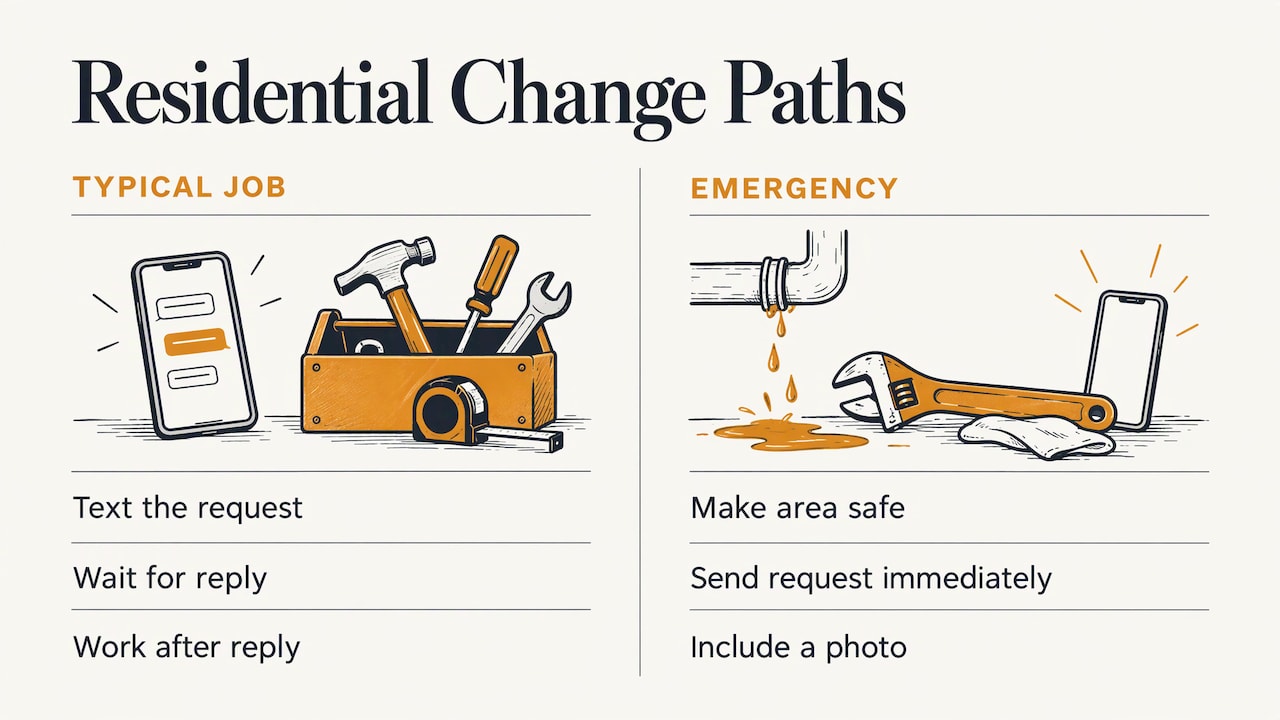
On a typical residential job, the simpler rule holds: text, wait for the reply, then work. If the change is an emergency, such as a leak, make the area safe first and send the request immediately with a photo.
When a signed change order is the better tool
A text is a fast request. It is not always the final document. Move to a signed change order when:
- The contract requires one. Follow the formal notice terms exactly. NASBP’s perspective is that a text is not automatically enough, and contractors should follow the contract’s formal process rather than assume an informal go-ahead will be enforceable.
- The change is large. There is no universal dollar line, so set your own in your contract and stick to it.
- Several people have authority. If a lender, an owner’s rep or a general contractor sits between you and the owner, text approval from the wrong person may not count.
- The customer is disputing scope. When the relationship is strained, a signed form is a better record than a quick reply.
SMACNA’s bulletin is blunt about the alternative: relying on an owner’s verbal assent and “trust” is not supported by the contract, case law or common sense, particularly with residential customers, where contractors may be held to a higher standard and barred from enforcing oral agreements. Completed written change orders put the contractor in a strong position.
A good middle path is to use the text for the quick yes and then send the formal change order for signature, referencing the text. For the full process, see our guide to the change order process in construction.
Save the approval where you can find it
A reply sitting in your personal text thread is hard to find in six months. The records guidance is consistent on this. The AACE Mid-Atlantic section says changes should be confirmed in writing, owner decisions on change orders or substitutions should be obtained in writing, and records should be factual, consistent and contemporaneous (ACEC Mid-Atlantic). Records made at the time of the event reduce later ambiguity about what changed and what the owner authorized.
For each approved text, keep together:
- the original request and the customer’s reply, with date and time
- the photo of the issue
- the price breakdown and the new contract total
- the schedule effect
- how it was approved (text, email, signature) and by whom
- the change number, so it ties to the invoice
If a dispute does arise, lawyers advise preserving more than a screenshot: Biazzo Law lists text messages, group chats, attachments, screenshots, invoices and payment records among the materials to keep. That is another reason to file approvals with the job rather than leaving them in a phone.
We go deeper on what to record in change order documentation, on client communication logs and on photo documentation. If you text estimates as well, how to text estimates to clients uses the same approach.
Carry the change to the invoice
The approval only pays off when the invoice matches it. List each approved change as its own line with its number, so the customer sees the same figure they agreed to. A final invoice that rolls extras into a single lump is the kind that draws the “I never approved that” reply. Keep your payment schedule and any draws in line with the changed total too.
Our perspective
Most contractors we talk about this with do the right thing in the moment. They ask, the customer says yes, and they get back to work. The failure comes later, at the desk, when the yes has to be turned into a record: finding the text, matching it to the estimate, adding the line to the invoice.
That is the gap we built Hechito to close. You talk through the job and take photos as you go, and the conversation and the details become organized records without retyping them at night. A change that was asked and answered on site should already be filed with the job when you sit down to invoice.
Our view is that the best paperwork habit is the one that costs you nothing extra in the field. If approvals, photos and prices land in one place the moment they happen, you protect your payment and keep your evenings.
Francisco
Put approvals, photos and invoices in one place
Hechito automates quoting, invoicing and job records from voice and photos captured in real time on the job. It organizes the documentation, sends estimates and invoices, chases payments, and manages receipts and bank reconciliation, in English and Spanish. Its virtual co-workers, Chalán, Lupita and Godínez, cover field, phone and bookkeeping tasks. You can see how they fit your work on the crew page, or look at the Hechito app for contractors.

If your customers and crew work in both languages, our guide to dual language estimates shows how that works in practice.
FAQ
What should a text asking for change approval say?
Name the change, say why it is needed, give the added price and the new total, state the schedule effect, and ask for one clear reply word such as “APPROVE 2”. Attach a photo when the issue is visible. Send one change per message.
Is a customer’s text reply enough to get paid for extra work?
Sometimes, but it depends on your contract, your state and the facts. A clear reply from the person with authority, tied to a stated price, is far stronger than a vague “ok”. If your contract requires a signed change order, follow that process, and see an attorney for any large or disputed change.
Should I start the extra work before the customer replies?
On most residential jobs, wait for the approval. Professional guidance is to get client approval before proceeding with additional work. In an emergency, make the area safe first and send the request with a photo right away.
How do I ask politely?
Start with what you found, state the cost plainly, say what happens if they decline, and give them room to look before answering. Short, factual messages read as respectful. Thank them in a confirmation text after they reply.
Where should I store text approvals?
Keep each one with the job: the request, the reply with its timestamp, the photo, the price and the change number, next to the estimate and the invoice. Records made at the time of the change are the most useful if a question comes up later.
Sources
- AIA Contract Documents: Change Management
- NASBP: ConsensusDocs and text messages
- Construction Executive: Keep Text Messages From Changing Contract Terms
- Cromeens Law Firm: Extra Work in Construction Contracts
- Pro Remodeler: Is Email Enough for Communicating Project Changes?
- SMACNA Contracts Bulletin #98
- ACEC Mid-Atlantic: Project Documentation
- Biazzo Law: Emails and Text Messages as Business Contracts
Recommended
This is the paperwork Hechito does for you — while you talk.