The Change Order Process in Construction, Step by Step

The Change Order Process in Construction, Step by Step

A change order is the signed paper that turns “while you’re here, can you also…” into billable work. The process is simple on paper: spot the change, describe it, price it, get every required signature, then do the work and bill it. Most contractors lose money in the gaps between those steps, usually because the work started before the paper did.
This guide walks through each step in the order it happens on a real job, shows how to price a change, and covers what to do when the owner says yes on the driveway but never signs anything.
HechitoKeep Change Details From Getting LostHechito captures job details through voice and images, helping contractors turn conversations into organized records without extra typing.Explore HechitoTL;DR
- A change order is a written amendment to the contract that changes scope, price, schedule, or all three. It is not only for mistakes.
- Get written approval before you start the changed work. Public agencies such as TxDOT say the same thing in their own manuals.
- Describe the change so a stranger could understand it: what changes, which contract documents it touches, the cost, and the time.
- When there is no time to negotiate, a directive lets work proceed while the price is settled, but you must track every hour and material.
- Photos, measurements, and daily notes taken at the moment of the change are your best protection in a payment dispute.
Table of Contents
- What a change order is, and what it is not
- Why the process matters more to small contractors
- The change order process, step by step
- When you cannot wait: directives and time and materials
- Who pays for a change order?
- Mistakes that cost contractors money
- Our perspective: the paperwork fails at the job site, not the office
- Where Hechito fits
- A short checklist to keep in your truck
- FAQ
- Sources
What a change order is, and what it is not
The Associated General Contractors of America defines a change order as an official change of any kind to the original scope of work or terms of a construction contract, agreed to by the owner, the contractor, and the project designer. It can add work, remove work, or adjust the price and the schedule.
A common misconception is that change orders exist to fix mistakes. AIA Contract Documents guidance explains that they are a basic project management tool for any modification to scope, budget, or schedule, whether it comes from unforeseen conditions, design changes, or regulatory updates. A homeowner who upgrades the tile after demolition and an inspector who requires an extra fire block are both change order events.
There are three instruments you will run into, and mixing them up is a frequent source of trouble. According to the City of Los Angeles Bureau of Engineering, the industry recognizes:
| Instrument | Use it when | Effect on price or schedule |
|---|---|---|
| Change order | Everyone has agreed to the change | Adjusts price, time, or both |
| Construction change directive | The work is urgent and terms cannot yet be negotiated | Work proceeds while the adjustment is settled |
| Architect’s supplemental instructions | The change is minor | No impact on cost or schedule |
On AIA contracts, the quick decision guide from AIA Contract Documents points to the G701 when the team has agreed on the change and any cost and time adjustment, and to the G714 directive when the work needs to move before the parties have fully agreed. On a small residential or light commercial job you may have no architect at all, and your contract or your own change order form does the same job.
Why the process matters more to small contractors
Delays in finalizing change orders interrupt cash flow, and that hits smaller firms hardest. A 2019 GAO report cited by AGC reached that conclusion about delays in the federal sector, and any small crew that has fronted lumber for a change that was never signed knows the feeling firsthand.
The arithmetic is blunt. You pay your crew and your supplier on your schedule. The owner pays on theirs, and only for work they can see documented and approved. An unsigned change leaves you carrying labor and material costs with nothing to point to.
The change order process, step by step
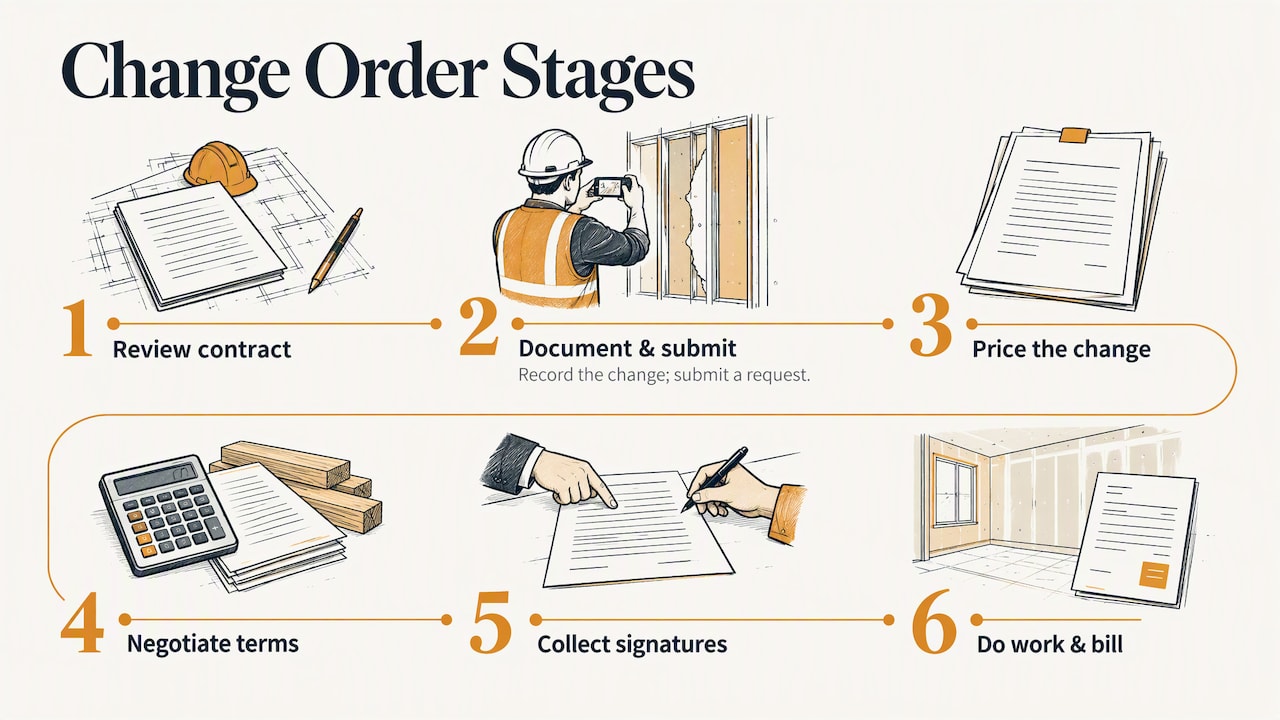
1. Read the contract before you react
Your contract decides how changes are handled. Look for who can authorize a change, whether it must be in writing, how pricing is determined (lump sum, unit prices, or time and materials), and any notice deadlines. Some contracts require a written notice within a set number of days after you discover a changed condition. Missing that window can cost you the claim, so find the clause now, not during a dispute.
2. Identify the change and stop to document it
The moment you see something that is not in the original scope, whether it is a request, a hidden condition, or a code requirement, capture it. Take photos with something in frame for scale. Write down the date, the location in the building, who asked, and what was said. Notes taken on the spot are far more convincing than a memory reconstructed at 9 p.m.
Caltrans’ construction manual stresses that clear, concise, and explicit documentation is the cornerstone of an approved change order, and our own read of it is that photos, site measurements, and itemized costs are what make a description hard to argue with. For a closer look at what to shoot and when, see our guide to construction photo documentation.
3. Submit a change order request
A request is your proposal, not yet an agreement. It describes the change, explains why it is needed, and gives a price and schedule impact. Send it to whoever has authority under the contract, which is often the owner, the owner’s representative, or the architect. Do it fast. Slow requests mean the owner has forgotten the conversation, or the work has already been built and the argument becomes about whether it was ever extra.
4. Price the change
Pricing is where disputes live. A defensible price has these pieces:
- Labor: hours by person or trade, at the rates your contract allows.
- Materials: itemized, with supplier quotes or receipts.
- Equipment: rentals or your own equipment at agreed rates.
- Subcontractors: their written quotes, passed through.
- Overhead and profit: as your contract specifies. Do not invent a markup the contract does not mention.
- Time: extra days, stated plainly, even if the answer is zero.
The Washington State Auditor’s Office notes that because change orders bypass competitive bidding, they need robust, documented processes so pricing is fair and reasonable. That is written for public owners, but the logic carries over to private work: an owner who can see how you got to the number is an owner who signs faster.
A worked example, with made-up numbers for illustration only. An owner asks you to move a bathroom wall six inches after framing. You log two carpenters for five hours each, a short run of new lumber, one extra inspection call, and a half day added to the schedule. You list each line with its cost, add the markup your contract allows, and state “+0.5 day.” That one page answers nearly every question the owner will ask.
5. Negotiate and agree
Expect questions. The owner may push back on the price, the days, or whether the work was already included. Stay with the documents: the plans, the scope of work, the photos from before. A tight scope of work written at the start makes this step shorter, because you can point to what was and was not included.
6. Write it up and collect signatures
Once the parties agree, the paper has to match the deal. AIA’s guidance says the description should be clear enough that someone outside the conversation can understand it: what is changing, which contract documents it affects, and the adjustment to the contract sum and time. The same AIA article lists the owner, contractor, and architect as signers on the G701. On your own form, make sure every person with authority under the contract signs.
A complete change order includes:
- Project name, address, and contract number or date
- Change order number and date
- A description of the work, added or removed
- The revised price, with the original contract sum and the new total
- The effect on the schedule, in calendar days
- Signature lines with printed names and dates
- Attachments: photos, sketches, quotes
7. Do the work, then bill it
The rule that protects you most is also the simplest. TxDOT’s contract administration manual says to make sure the change order is approved before starting the changed work, while noting that an area engineer may give verbal approval ahead of formal approval, with written documentation to follow. Take that as the ceiling for private work too: a verbal go-ahead is fine to keep the crew moving only if you confirm it in writing the same day, by text or email at minimum.
After approval, tie the change to your billing. The City of Los Angeles manual points out that linking the change order to the original contract’s schedule of values keeps tracking and billing clear. Without that link, added work becomes opaque on the pay application, and that raises the odds of disputes or delayed payment. Our posts on progress billing and payment schedules and draws show how field photos support each draw request.
When you cannot wait: directives and time and materials
Sometimes the wall is open, the weather is turning, and the owner says “just do it, we’ll sort out the money.” That is what a construction change directive is for. It authorizes the work to proceed while price and time are determined later.
This is the riskiest moment for a contractor, because the number is not agreed. Experts quoted in the Caltrans manual advise that when negotiations fail, you should not simply stop work if the contract allows unilateral change orders. Instead, document every daily labor, material, and equipment cost under a force account or time and materials basis to preserve your ability to recover. In practice:
- Get the directive signed before the first hour is worked.
- Keep a separate daily record for the directed work: who was there, hours, materials, equipment.
- Photograph the work at start, middle, and finish.
- Submit the tally to the owner at the end of each day or week, not at the end of the job.
A good daily construction log is what turns “we think it took about three days” into a figure the owner’s side can verify.
Who pays for a change order?
The party that caused or requested the change generally bears the cost, but the contract decides. An owner-requested upgrade is the owner’s cost. An unforeseen condition might be the owner’s cost or might fall under your contingency, depending on the contract language. A mistake in your own work is yours. If you are unsure, ask your contract attorney before you price it, not after.
Can a contractor request a change order? Yes. Contractors initiate change orders all the time, for hidden conditions, code-driven changes, or supplier substitutions. Request, don’t assume.
Mistakes that cost contractors money
- Starting before approval. The most expensive habit in the trade.
- Vague descriptions. “Extra electrical work” invites a fight. “Add four recessed lights in kitchen, move one circuit to new breaker” does not.
- Missing the notice deadline. Check the contract’s timing clause the day you spot the change.
- Lumping several changes together. One change per order keeps approval simple and reasons clear.
- Forgetting the schedule. If the extra work delays a trade that follows, say so in the order.
- Not billing it. An approved order that never makes it onto an invoice is a gift. Confirm your payment terms say how change orders are invoiced.
Public owners publish their own timelines, which show how long a clean process can take. The Maryland Department of General Services guidelines, issued October 1, 2024, include a process diagram with typical processing times for each stage. Private work is faster, but the lesson holds: each handoff takes time, so start the clock early.
Our perspective: the paperwork fails at the job site, not the office
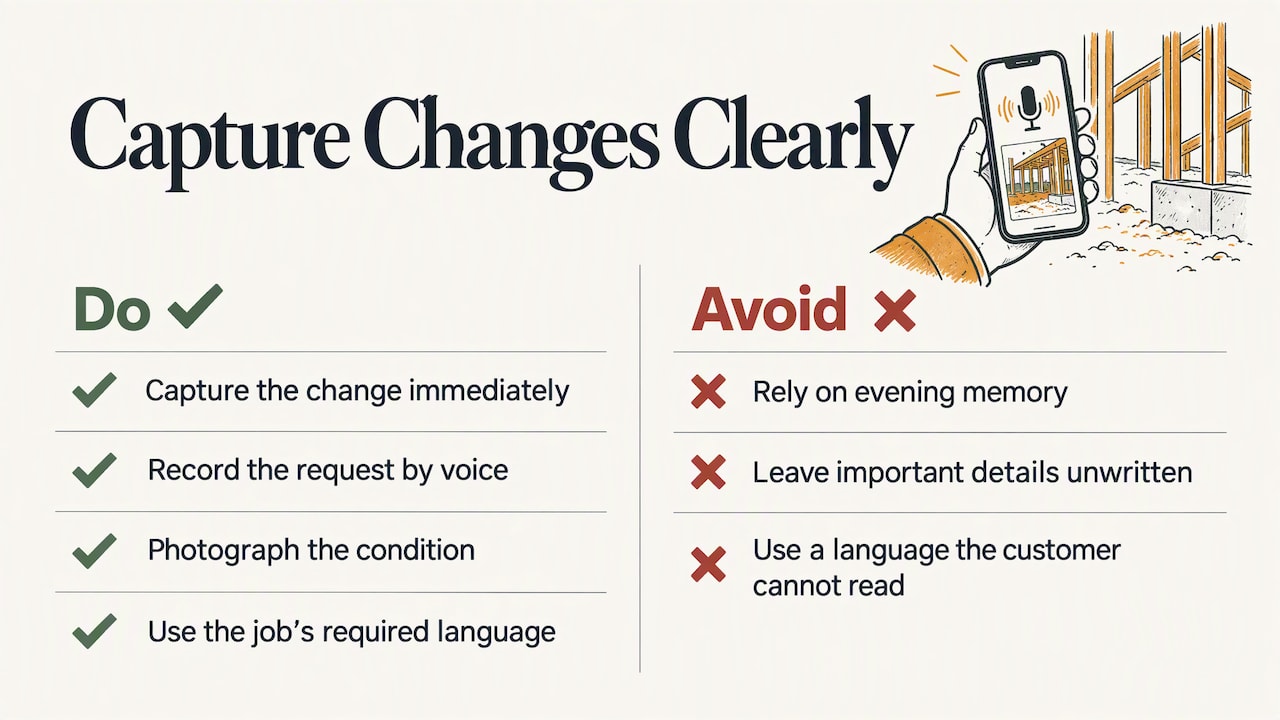
We build Hechito for contractors and tradespeople, and the same pattern shows up in the paperwork problem again and again. The change happens in a conversation: in a kitchen, on a roof, on the phone with a supplier. The paperwork happens hours later, from memory, in the evening. By then the detail that mattered is the one nobody wrote down.
That is why we think change orders should be captured at the moment of the change, by voice and photo, not typed up at the end of the day. Say what the customer asked for, snap the condition, and let the record build itself. A contractor who spends no extra time on it is far more likely to write it down at all.
We also think language should never be a barrier to a clear change order. Many crews and many customers speak Spanish, English, or both. A change that the customer cannot read in their own language is a change they can fairly dispute later. That is why Hechito works in both languages and produces documents in the language the job requires.
— Francisco
Where Hechito fits
A change order is only as good as the notes behind it. Chalán is the Hechito crew member that turns what you say and photograph on site into quotes and invoices, so the description, the photos, and the price come from the same moment instead of from your memory later. For the wider picture of how voice and photos become estimates, see how contractors turn them into dual-language estimates. If you want to see how it all fits together, start with the Hechito page for contractors, or look at the crew and pricing pages.
A short checklist to keep in your truck
- Does the contract say how changes must be authorized? Check before you start.
- Photos, measurements, date, and who asked: captured on the spot.
- Written request sent the same day.
- Itemized price: labor, materials, equipment, subs, markup, days.
- Every required signature, with dates.
- Approved amount linked to the schedule of values.
- Change billed on the next invoice or pay application.
FAQ
What is the difference between an RFI and a change order?
An RFI (request for information) asks a question about the plans or specs and does not change the contract on its own. A change order modifies the contract’s scope, price, or schedule. An RFI answer can lead to a change order if the answer means extra work.
Can work start before a change order is signed?
The safest answer is no. Public agency manuals such as TxDOT’s say to get approval before the changed work begins, with limited allowance for verbal approval followed by written documentation. If you must move early, use a directive and track every cost.
How do you price a change order?
Break it into labor, materials, equipment, subcontractor quotes, markup allowed by your contract, and any added time. Keep receipts and photos with the order. Itemized numbers get approved faster than a single lump figure.
Who has to sign a change order?
Your contract says. On AIA forms like the G701, the owner, contractor, and architect sign. On a small private job, it is usually the owner and the contractor, plus anyone else the contract names.
Sources
- Change Orders, Associated General Contractors of America
- Construction Change Orders: Which Form, Who Signs, and What to Check, AIA Contract Documents
- 20.1 Introduction, City of Los Angeles Bureau of Engineering
- Chapter 5, Section 3: Change Orders, Caltrans
- Best practices for change orders, Washington State Auditor’s Office
- Chapter 7: Changes to the Contract, TxDOT
- Change Order Guidelines, Maryland Department of General Services
Recommended
This is the paperwork Hechito does for you — while you talk.