Change Order Documentation: What to Record and How

Change Order Documentation: What to Record and How

Good change order documentation answers four questions before anyone swings a hammer: what changed, why it changed, what it costs, and how much time it adds. Then it gets signed. If one of those is missing, you are doing the work on a handshake and hoping the payment follows. This guide shows what a complete change order file holds, how to word the change so nobody can read it two ways, and how to capture all of it from the job site without a night of typing.
HechitoCapture Change Details on SiteCapture job conversations and details in real time with Hechito, turning voice and images into organized records without extra typing.Visit HechitoTL;DR
- A change order is a written amendment to the contract. It should name the trigger, the scope, the cost breakdown, the time impact and carry signatures from both sides.
- Back every change order with proof: signed daily tickets, time sheets, material receipts, equipment hours and dated photos.
- Write the wording so a stranger could price and perform the work from the page alone, with a dollar figure and a number of days.
- Get approval before you start or bill. If work must start first, agree in writing on a not-to-exceed cap or time-and-materials basis.
- Capture the conversation and photos the moment the change is requested. That is when the details are fresh and the customer is standing there.
Table of Contents
- What a change order is and when you need one
- What belongs in a change order record
- How to word the change so it holds up
- The change order process, step by step
- Why the writing requirement matters
- Change orders, RFIs and directives are different documents
- Build a defensible file
- Our view: the paperwork fails at the moment of the conversation
- Capture change orders from the job site with Hechito
- FAQ
- Sources
What a change order is and when you need one
A change order identifies required changes to the original plans, specifications or other contract documents. Once it is negotiated and properly signed, it becomes a legal amendment to the contract. That sentence comes from a public agency manual, but the logic holds on a kitchen remodel as well as a municipal job: the signed page is what changes your price, not the conversation.
The same manual lists the most common triggers: changed or unforeseen conditions, errors and omissions in the plans, and changes in scope. In residential and light commercial work they show up in familiar ways:
- You open a wall and find rot, old wiring or a plumbing run that is not on any drawing (unforeseen condition).
- The plans call for a fixture that does not fit the framing, so the plan has to be corrected (error or omission).
- The owner decides to add a second sink, upgrade the flooring or move a doorway (scope change).
- The owner delays decisions or access, and your crew loses days (time impact with no scope change at all).
If the customer asks for it, or the site forces it, and it is not in the contract, it needs a change order. A small one is still one. Small, undocumented extras are exactly where margin leaks.
What belongs in a change order record
Think of the record as two layers: the document itself, and the proof behind it.
The document
A university facilities standard describes a defensible change order as one that identifies the project, the contract number, the change order number, the date, the total of prior change orders and the revised contract sum. It also includes the reference to what triggered the change, the scope, a cost breakdown, the time impact and the required signatures.
For a small contractor, that translates into a one- or two-page form with these parts:
| Element | What to write | Why it matters |
|---|---|---|
| Project and contract | Job name, address, contract date, customer name | Ties the page to the right agreement |
| Change order number and date | Sequential number (CO-01, CO-02) | Lets anyone track the order of changes |
| Trigger | Customer request, hidden condition, plan error, code requirement | Shows who caused the change, which decides who pays |
| Scope description | Exactly what is added, removed or substituted | Prevents later “I thought that was included” fights |
| Cost breakdown | Labor, materials, equipment, subcontractors, markup | Lets the customer see what they are paying for |
| Time impact | Added days, or “no change to completion date” | Protects you from delay claims |
| Contract sum | Original sum, prior changes, this change, new total | Keeps the running total visible |
| Signatures | Customer and contractor, with dates | Makes it enforceable |
The AIA’s subcontract change order form works the same way: it requires signatures from both parties and a detailed description of the change, and it tracks adjustments to price and time. You do not need an AIA form for a residential job, but the fields are a solid checklist.
The proof behind it
The document says what was agreed. The backup shows the number is honest. A West Virginia University facilities standard lists the supporting records: signed daily job tickets, labor time sheets, materials invoices, receipts or delivery tickets, and a list of equipment used with the applicable rates.
Add to that list anything that shows the condition before you touched it: dated photos of the rotted subfloor, the unmarked pipe, the as-found wiring. If you want a deeper look at what a usable photo record looks like, our guide to construction photo documentation covers the field rules. Daily logs matter too, because they put the change on a timeline. See our piece on daily construction logs for the seven fields that hold up in a claim.
It helps to see how an organized file is built in other fields of construction work. For example, a complete building application checklist shows how a full documentation package for a building project gets assembled, with every required item accounted for before it goes to the authority.
How to word the change so it holds up
This is the part contractors ask about most, and it is the part the top-ranking guides handle thinnest. Wording is not about legal-sounding language. It is about removing every place where two people could read the same sentence differently.
Five rules for clear wording
- Name the trigger first. Start with why the change exists. “Owner requested” and “unforeseen condition” lead to different conversations about who pays.
- Describe the work as a verb and a location. “Install” beats “address.” “Master bath, north wall” beats “the bathroom.”
- Name quantities, materials and models. “Replace 48 sq ft of subfloor with 3/4-inch plywood” can be priced. “Fix the subfloor” cannot.
- State what is not included. If the new vanity does not include the faucet, say so. Exclusions stop scope from creeping back in.
- Give a price and a day count, even if the day count is zero. “Adds 2 working days” or “No change to completion date” are both complete answers. Silence is not.
A before-and-after example
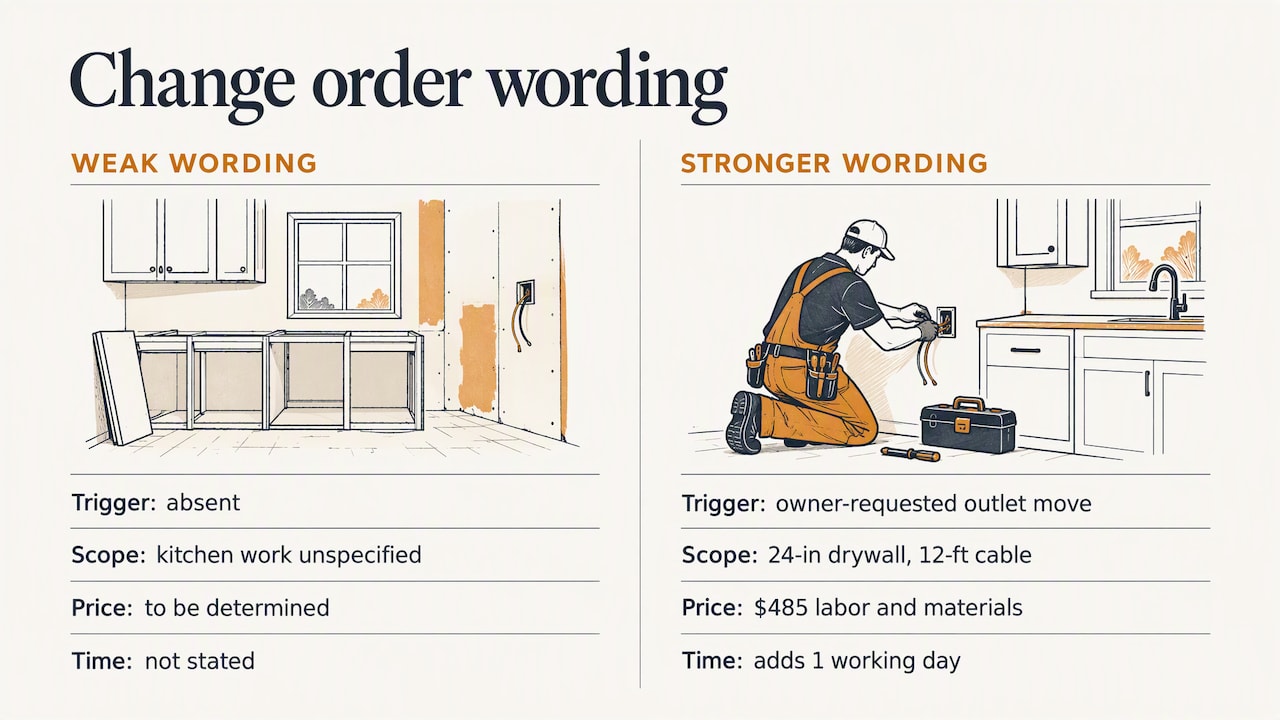
Weak wording:
Additional work in kitchen per owner. Extra cost to be determined.
This fails on every count. There is no trigger, no scope, no price and no time. “To be determined” invites a dispute.
Stronger wording:
CO-02. Owner requested relocation of the kitchen island outlet from the east face to the south face. Scope: cut and patch 24 inches of drywall, run 12 feet of 12/2 cable from the existing junction box, install one 20-amp GFCI receptacle, and repaint the patched area to match. Excludes any change to cabinetry. Labor and materials: $485. Adds 1 working day to the schedule. Original contract sum: $42,000. Prior change orders: $1,200. This change: $485. Revised contract sum: $43,685.
That is a template to adapt, not a quote for your job. The numbers are placeholders. What carries over is the structure: the trigger, a scope anyone could build from, the exclusions, the price, the days and the running total.
If you work with Spanish-speaking customers or crews, the same document may need to exist in both languages. Our article on dual language estimates shows how to keep the two versions identical in scope and price. For the broader question of how to define the work in the original contract so fewer changes arise, see our scope of work checklist.
The change order process, step by step
The process is simple to state and easy to skip under time pressure. The university standard sums it up this way: capture the trigger and scope, price the change, analyze its time impact, get approval, then update the budget, schedule, subcontractor commitments and billing. Here is how that looks in a contractor’s week. For a longer walkthrough, see our change order process guide.
- Stop and flag. The moment a request or surprise appears, tell the customer that it is a change and will be documented. Take photos and note the date and who was present.
- Describe the change. Write the scope using the five wording rules above.
- Price it. Break out labor, materials, equipment and subs, then add your markup as the contract allows.
- State the time impact. Count the added days, or confirm there are none.
- Send for signature. Send it the same day if you can. The longer a change order sits, the more likely the customer remembers a different deal.
- Start work after approval. Written approval first, work second.
- Bill it. Add the approved amount to the next invoice or draw, with the change order number on the line.
- Log it. Update your running contract total and your job costs so the change shows up in your numbers, not just on the page.
What if the work cannot wait?
Sometimes a leak is running or a crew is on site and idle. Public agency guides recognize this. The Wisconsin DOT guide calls for agreement on the basis and amount of payment before work proceeds, except when prior approval of the concept is obtained for work that must start before the price is settled. The university standard likewise notes that work may proceed before pricing is agreed under not-to-exceed or time-and-materials arrangements.
For a private job, the version of that is a short written note before you start: “Proceed with leak repair at the master bath, time and materials, not to exceed $1,500 without further approval.” A text or email the customer answers with “approved” is better than nothing, as long as your contract allows it. Then the full change order follows once the real number is known.
Do not bill before the paper is done
Los Angeles shows how strict some owners are. On City projects, the contractor typically may not begin or bill for change order work until the contract has been legally amended. Private owners are usually looser, but the instinct is the right one. An unsigned change order is a receivable you cannot defend.
Why the writing requirement matters
Most construction contracts say a change order must be in writing and approved by all parties before you are paid for the change. Courts do not always enforce that clause strictly. An American Bar Association article notes that a course of performance can waive the written change order requirement, and that frequent deviations from the written procedure may lead to waiver claims.
Take the practical lesson without relying on it. If you have a habit of doing extras on a handshake and getting paid, you may be able to argue waiver later, but that is a fight you would rather not have. Following your own written procedure every time is cheaper than arguing about it. For contract-specific questions, such as what your state allows or what your contract clause means, talk to a construction attorney in your state.
Change orders, RFIs and directives are different documents
These terms get mixed up, and mixing them costs money.
| Document | What it does | Changes price or time? |
|---|---|---|
| RFI (request for information) | Asks the designer to clarify the plans | Not by itself |
| Change order | Amends the contract scope, price and time | Yes, once signed |
| Construction change directive | Orders work to proceed before the price is agreed | Adjustment follows later |
Minnesota State’s guidance describes an RFI as a request for design clarification and a directive as a written order to proceed, used when the scope is not definitive or there is not enough time to turn a proposal request into a change order. An RFI answer can lead to a change order, but the RFI is not the change order. If the designer’s reply adds work, price it and paper it.
Build a defensible file
Documentation has two audiences: the customer who must approve it now, and whoever reads it in a dispute or audit later. Baker Tilly advises that thorough, well-organized documentation reduces project risk and gives owners, architects and contractors a defensible record in disputes or audits. Caltrans, for its part, requires change orders to be clear, concise and explicit, with a memorandum explaining the need for the change and the reasonableness of the compensation.
You can borrow that for your own jobs. For each change order, keep in one folder:
- The signed change order
- The original request (text, email or a note of the conversation, with date)
- Before photos and progress photos
- Time sheets and daily logs for the days the work happened
- Material receipts and sub invoices
- A line in your running change order log: number, date, description, cost, days
Two habits make the biggest difference. First, number every change order in sequence so a missing one is obvious. Second, tie each change to your job costing, so you can see whether the $485 you charged actually covered your costs. Our article on job costing for contractors goes into how field data feeds that. When it comes time to bill, progress billing and a clear payment schedule keep approved changes from getting lost between draws.
Our view: the paperwork fails at the moment of the conversation
We talk to contractors and tradespeople all the time, and the pattern is consistent. Nobody skips change orders because they do not understand them. They skip them because the change comes up when the person is on a ladder, in a crawlspace or halfway through a conversation with an owner who is already walking away. By the time they are home, the details have blurred. The price is a guess, the exact words the customer used are gone, and writing it up feels like a second job after the first one.

So we think the fix is not a better form. It is capturing the change while it happens. Say what the customer asked for out loud. Snap the photo of the condition. Let the system turn that into a written record, so the typing is not the barrier between you and a signed page. The record that exists at 10 a.m. beats the perfect one you meant to write at 9 p.m.
We also think the language of the document should match the people on the job. A customer who reads Spanish should be able to approve a change in Spanish, and the English version in your file should say exactly the same thing. That is why we built Hechito to work in both languages and to produce documents in whichever one the job requires.
— Francisco
Capture change orders from the job site with Hechito
Hechito is built for contractors and tradespeople who would rather be working than catching up on paperwork. It turns voice notes and photos taken on the job into organized records, then carries them through quotes, estimates and invoices. You can talk through a change the way you would tell a colleague, and the details, including the conversation and the images, are filed with the job instead of living in your head or your camera roll.

For the money side, Chalán handles voice quotes and invoices from the job site, and Godínez matches bookkeeping to your jobs so receipts and bank activity line up with the work. You can see how the crew fits together on the Hechito crew page, and the pricing page shows what each one costs.
FAQ
What should be included in a change order?
Include the project and contract details, a change order number and date, the trigger for the change, a specific scope description, a cost breakdown, the time impact and signatures from both parties. Add the running contract total: original sum, prior changes, this change and the new sum. Keep supporting records such as photos, time sheets and receipts in the file.
Do change orders have to be in writing?
Most contracts require it, and you should treat the requirement as binding. Courts can find that the parties waived the requirement by how they actually behaved, but that outcome is uncertain and leads to disputes. Check your contract’s change clause, and ask a construction attorney in your state if the wording is unclear.
What is the difference between an RFI and a change order?
An RFI asks the designer or owner to clarify the plans. A change order amends the contract’s scope, price or schedule. An RFI response may reveal extra work that then needs its own change order.
Can I start work before the change order is signed?
Only if your contract and the customer allow it, and ideally with written approval of a not-to-exceed amount or a time-and-materials basis. Public agencies often bar billing for the change until the contract is formally amended. Get at least a written message of approval before you start, and finish the full change order as soon as the price is known.
How do I word a change order so it is not disputed?
Name the trigger, describe the work with a verb, a location and quantities, list what is excluded, and give both a dollar amount and a number of added days. Replace phrases like “to be determined” with a cap or a basis for pricing. A stranger should be able to price and perform the work from the page.
Sources
- 20.1 Introduction, Bureau of Engineering, City of Los Angeles
- 20.4 Finalizing Change Orders, Bureau of Engineering, City of Los Angeles
- Construction Change Orders, West Virginia University Facilities Management
- Northeast Region Supplemental Construction Administration Guide, Wisconsin DOT
- Chapter 5, Section 3: Change Orders, Caltrans Construction Manual
- Manage construction change orders to reduce risks, Baker Tilly
- Construction change overview, Minnesota State
- Instructions: G701S-2017, Change Order, AIA Contracts
- Change Orders: Do they really need to be in writing?, American Bar Association
Recommended
This is the paperwork Hechito does for you — while you talk.