Contractor Onboarding to Software: A Practical Setup Guide

Contractor Onboarding to Software: A Practical Setup Guide

Onboarding a contractor business to software works when the first week asks for talking and photos, not typing. Set up your business details once, bring in your crew and subcontractors with only the access each needs, and run one real job through the system before you move everything over. The tools that fail are the ones that need an evening of data entry before they give you anything back.
This guide covers both meanings of the phrase. First, getting yourself and your crew running on a quoting, invoicing and job-records tool. Second, bringing subcontractors into your paperwork so you can pay them correctly. It is written for owners and tradespeople who would rather be on the job than at a keyboard.
HechitoSpend Less Time on PaperworkHechito captures job details through voice and images, then helps turn them into organized records from quoting through invoicing.VisitTL;DR
- Start with one job, not your whole business. Run a single live quote, job and invoice through the tool before you import anything.
- Choose software that captures voice notes and photos on site. Setup that depends on typing at night rarely survives a busy season.
- For every subcontractor, collect a signed W-9 before the first payment. Without a correct taxpayer ID, the IRS requires 24% backup withholding.
- Give each person only the access their role needs, and remove it when the job ends.
- Compare tools on what the monthly price covers per user and per added feature, not on the headline number.
Table of Contents
- What onboarding to software really involves
- Step 1: Decide what pain you are fixing
- Step 2: Pick the capture method before the features
- Step 3: Gather the documents once
- Step 4: Set up people and access
- Step 5: Run one real job through it
- Step 6: Automate in the right order
- What to compare before you commit
- Where we come in
- Our view: onboarding should not be a project
- Common mistakes to avoid
- A realistic first month
- FAQ
- Sources
What onboarding to software really involves
For a small contractor, onboarding is four things in sequence: your business profile, your people, your job records, and your money flow. Each one has a few decisions that are easy to get wrong.
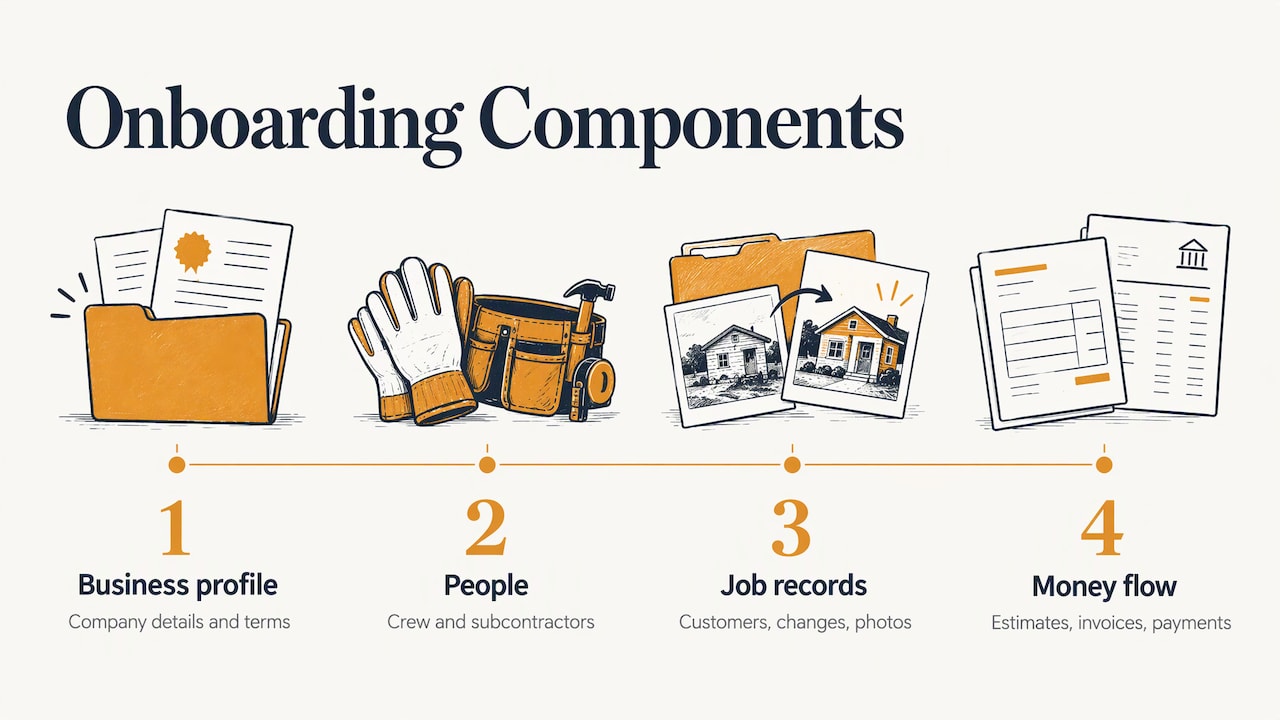
Business profile. Company name, license numbers, insurance details, logo, the language your customers expect, and the terms that go on every estimate. You enter this once, and every quote and invoice pulls from it afterward.
People. You, your crew leads, office help and any subcontractors. They do not all need the same view. A painter on site needs to capture notes and photos. Whoever handles the books needs invoices and receipts. A sub needs almost nothing from your system at all.
Job records. Customer details, what was promised, what changed, photos before and after, and the conversations that explain why a price moved. This is the part that usually lives in text threads and your memory.
Money flow. Estimates out, invoices out, payments chased, receipts in, and the bank matched to the jobs. If this is not connected to the job records, you are doing the same work twice.
Big-company contractor management platforms handle all of this with committees, portals and approval chains. A crew of three to fifteen does not need that. You need the shortest path from “we talked about it on site” to “it is documented and billed.”
Step 1: Decide what pain you are fixing
Before you open any tool, write down the three places where paperwork costs you money. For most trades they are the same:
- Quotes that go out days late because you write them at night.
- Change orders that were agreed verbally and never billed.
- Receipts that sit in a truck until tax time.
- Invoices that go out late, and late invoices that get paid late.
These three or four problems are your onboarding test. If the software does not fix them in the first two weeks, switching was not worth the effort, however many features it lists. Our own guides on reducing paperwork without losing records and the estimate to invoice workflow show what a lean version of this looks like.
Step 2: Pick the capture method before the features
The biggest onboarding risk is not the software. It is the habit. If recording a job means opening a form and typing, the crew will skip it on the busy days, which are exactly the days that produce disputes.
So ask one question first: how does information get in? There are three common answers.
| Capture method | What it asks of you | Where it breaks down |
|---|---|---|
| Typed forms and templates | Sitting down to enter every field | Skipped on busy days, finished at night |
| Photo apps with manual notes | Snapping photos, then typing the context | Photos with no explanation attached |
| Voice and photo capture | Talking through the job and taking pictures | Needs a tool built to turn speech into records |
Hechito is built around the third approach: you talk and snap, and the quote, invoice and job record are organized from what you captured. The tool works in English and Spanish, so a crew that switches between the two can speak either or both, and documents come out in the language the customer needs. If your crew is bilingual, that matters more than any template library. A tool that only works well in one language leaves half the crew doing paperwork the old way.
You can see the sequence on the how it works page.
Step 3: Gather the documents once
Even with voice capture, a few documents have to exist before you start. Collect them in one folder or one sitting so setup does not stretch across weeks.
For your own business:
- Contractor license and number for your state
- Certificate of insurance
- Your standard payment terms and any late-payment language
- A few past estimates and invoices, so you can see the wording you already use
For each subcontractor:
- Signed Form W-9
- Certificate of insurance and license, where your state or your customers require them
- Signed agreement or purchase order covering scope and payment
- Payment details
The W-9 is the one to treat as non-negotiable. It is the IRS form used to get a payee’s taxpayer identification number, and the IRS instructions for requesters state that when a payee fails to give a TIN, the payer must withhold 24% of reportable payments and deposit it with the IRS until the problem is fixed. Collect it before the first check goes out, not after.
At year end, you report what you paid. The IRS instructions say to file Form 1099-NEC for each person you paid at least $2,000 in nonemployee compensation during the year, for services in the course of your business. Thresholds and forms can change, so check the current IRS instructions each January, and ask your CPA how it applies to your mix of subs and suppliers.
Subs belong in your accounts payable, not on your payroll. If you are unsure whether someone is truly an independent contractor or should be an employee, that is a question for your accountant or an employment attorney, not for software.
Step 4: Set up people and access
Give each person the smallest set of permissions that lets them do the job. It sounds like an IT rule, but it protects a contractor in a plain way: customer addresses, pricing, margins and bank details are not for everyone.
A workable split for a small crew:
- Owner: everything, including pricing, payments and bank connections.
- Field lead: capture jobs, photos and notes, send estimates you have approved.
- Office or bookkeeper: invoices, receipts, reconciliation.
- Subcontractors: usually no system access. Send them a work order, and keep their paperwork in your records.
When a job ends or someone leaves, remove their access that day. Write it into your closeout checklist so it does not depend on memory.
Onboarding checklists built for other industries can still help you think about readiness. This onboarding checklist with five gates moves from signature to go-live, a sequence worth borrowing: nothing starts until the previous gate is closed.
Step 5: Run one real job through it
Do not import two years of history. Pick one live job and run it start to finish.
- Capture the walkthrough. Talk through the scope with the customer standing there, and take photos of the conditions.
- Send the estimate. Review it, fix anything the tool got wrong, and send it from the same place.
- Log changes as they happen. When the customer adds a bathroom fan, say so on the spot. It becomes part of the record, with a photo, instead of a fight later. Our guide to client communication logs covers what is worth recording.
- Snap receipts the same day. Tag them to the job, not to a pile. See the job-based receipt system.
- Invoice from the record. The invoice should come from what was captured, not from a fresh recollection at 9 p.m.
- Chase what is unpaid. Follow a set schedule for reminders. The overdue invoice plan lays one out.
At the end of the job, ask three questions. How many minutes of typing did it take? Did anything get lost between the field and the office? Did the invoice go out sooner than usual? If the answers are good, add the next job. If not, you have found the problem on one job rather than twenty.
Step 6: Automate in the right order
It is tempting to switch on every automation in week one. Resist it. A sensible order is the one the money follows.
- Estimates and invoices, because they bring cash in.
- Payment terms and reminders, because they speed up what you are owed. A checklist of payment terms that cut invoice rejections helps here.
- Receipts and bookkeeping, because they clean up your tax picture. Our piece on bookkeeping for contractors using field capture shows how.
- Phone answering, because missed calls are missed jobs.
The same logic appears in this guide to the first onboarding steps to automate: pick the steps that repeat most often and cost the most when they slip, then move outward from there.
What to compare before you commit
Search results for this topic are full of enterprise contractor management platforms and employee onboarding tools. Those are built for HR teams managing hundreds of workers. For a trade business, compare on a shorter list:
- How information gets in. Typing, photos, or voice. See Step 2.
- How far the tool goes. Does it stop at recording, or does it finish the quote, the invoice, the reminder and the reconciliation?
- Language. Can your crew and your customers each use the language they prefer?
- Pricing structure. Is it a flat fee, a per-user fee, or a charge for each added feature? Ask what a second and third user cost, and what the phone and bookkeeping features cost on top.
- Who does the setup work. If you must build templates and import data first, add the hours to the price.
- Exit. Can you export your jobs, invoices and receipts if you leave?
Hechito publishes its pricing, and the structure is built around adding the help you need rather than a bundle of features you do not. See the pricing page for the current plans.
Where we come in
Hechito is a job, quote and invoice tool for contractors and tradespeople. You capture the job by voice and photos, and the paperwork follows from it. Instead of one app with a hundred menus, you add the help you need as a virtual coworker, each a separate plan:
- Chalán handles voice quotes and invoices from the job site.
- Lupita is a bilingual answering service for your business.
- Godínez does bookkeeping that matches the bank to your jobs.
Most contractors start with the field side, the quoting and invoicing, then add the others as the business grows. You can look at all three on the crew page, or see how the whole system fits a trade business on the contractors page.
Our view: onboarding should not be a project
Most software asks a contractor to become an office worker first. Build your templates, enter your customers, set up your price list, and then, after a week of evenings, you may start to save time. That is backward.
We built Hechito on a different idea. The work already happens out loud and in front of a camera: you walk the job, you talk with the customer, you point at the problem. If a tool can listen to that and turn it into a quote, an invoice and a record, then onboarding is simply doing your next job the way you already do it.
That is also why we work in both English and Spanish. A lot of crews talk in both, and the paperwork should not force them to pick one. You speak either, or both, and the document comes out in the language the customer needs.
And we think of each part of the paperwork as a coworker you hire, not a subscription you manage. One handles the field, one answers the phone, one keeps the books. You hire the one you need today and add the next when you are ready.
Francisco
Common mistakes to avoid
Importing everything first. Old data is rarely clean. Start with new jobs and bring history over only if you will use it.
Paying subs before the W-9. It creates the 24% withholding problem and a scramble in January.
Giving everyone full access. Pricing and margins are for the owner and whoever runs the books.
Skipping the closeout. A job is not done until the final photos, the invoice, the receipts and the access removal are done.
Letting the crew opt out. If one person keeps notes in a text thread, you still have a gap. Make capture on the job site the rule from day one, and choose a method that is quicker than the old way, or the rule will not hold.
Judging by the demo. A demo is built on clean data. Judge by your own messy first job.
A realistic first month
Week 1: Business profile, insurance and license details, payment terms. Run one job from walkthrough to invoice.
Week 2: Add the field lead. Run three to five jobs. Start tagging receipts to jobs.
Week 3: Turn on payment reminders. Collect W-9s from every active sub and store them with their agreements.
Week 4: Review. Count how many invoices went out within a day of finishing, how many change orders were captured, and how many receipts are matched. Then decide which virtual coworker to add next.
By the end of the month, the question is no longer “are we on the software?” It is whether the paperwork is finished before you leave the site.
FAQ
How long does it take to onboard a small contractor business to software?
With a capture-first tool, you can send your first real estimate from the first job. Plan a month to get your crew, subs and money flow in a steady routine. Tools that start with data imports and templates take longer because setup is done before any benefit shows up.
Do I need to put my subcontractors into the software?
Usually not. Subs need a work order and a way to be paid. What you need from them is a signed W-9, insurance and a written agreement, all stored with their job records. Give system access only to people who must record or bill work.
What paperwork do I need from a subcontractor before paying them?
A signed Form W-9 comes first, since without a correct taxpayer ID the IRS requires 24% backup withholding. Add a certificate of insurance, your state license where required, and a signed scope and payment agreement. Ask your accountant how to handle year-end 1099-NEC reporting.
What should I look at in pricing?
Look at the cost per user, the cost of each added feature such as phone answering or bookkeeping, and how much setup time you must spend yourself. Hechito’s plans are listed on its pricing page.
Sources
- IRS Instructions for the Requester of Form W-9
- IRS Instructions for Forms 1099-MISC and 1099-NEC
- Onboarding checklist with five gates
- First onboarding steps to automate
Recommended
This is the paperwork Hechito does for you — while you talk.