Invoice Chase Automation: How Contractors Get Paid Faster
Invoice Chase Automation: How Contractors Get Paid Faster
Invoice chase automation means your system sends the payment reminders, follows up on overdue invoices and stops the moment the money lands, so you never write “just checking in” at 9 p.m. again. For a contractor, the setup that works is simple: a clear first invoice with a pay link, a friendly reminder before the due date, a firmer nudge after it, and a hard stop when the invoice is paid, disputed or corrected. The rest of this guide shows how to build that sequence, what to put in each message, and which checks keep automation from embarrassing you in front of a good customer.
HechitoSpend Less Time on Invoice AdminHechito turns job details captured by voice and images into organized records, helping contractors reduce paperwork from quoting through invoicing.Visit HechitoTL;DR
- Automate the loop, not the relationship: send the invoice, remind before the due date, follow up after it, and stop automatically when it is paid.
- Put the amount, due date and a pay link in the very first invoice email so a ready customer never needs a reminder.
- Check the invoice status right before every send, and keep an exception list for disputes, agreed extensions and customers you handle by hand.
- For business-to-business email in the U.S., the FTC’s CAN-SPAM rules still apply, and the debt collection law covers consumer debts, not typical commercial invoices.
- Capture the job details by voice and photo on site, and the invoice and the chase can start from the same record.
Table of Contents
- What invoice chase automation actually is
- The reminder sequence that works for contractors
- Partial payments, disputes and silent customers
- Checks that stop automation from making mistakes
- U.S. rules to keep in mind
- Perspective
- Where the invoice and the chase start
- Hechito’s approach to chasing payments
- A simple setup you can use this week
- FAQ
- Sources
What invoice chase automation actually is
Chasing an invoice by hand is a small task repeated many times. You remember that a job was billed, you check whether it was paid, you find the customer’s email or number, you write something polite, and you do it again a week later. Most contractors do this at the kitchen table after a full day on site, which is exactly when it is easiest to skip.
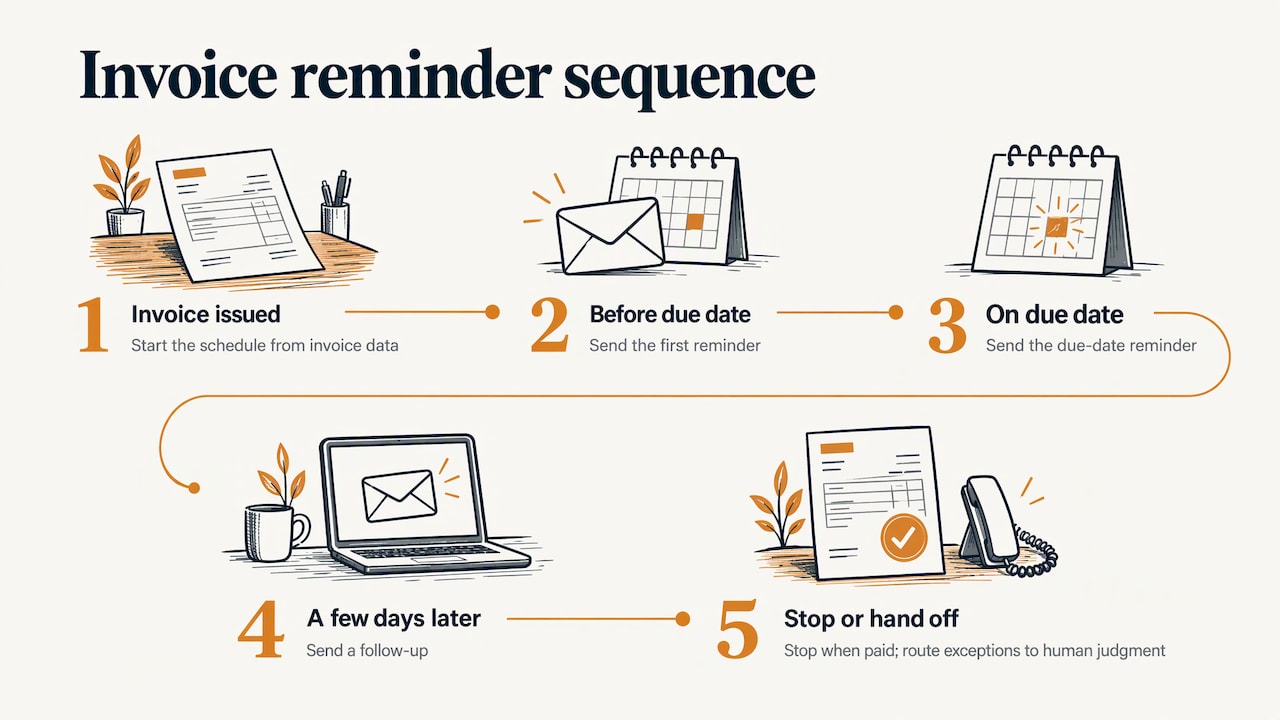
Automation turns that habit into a rule set. A typical rule reads: invoice issued, reminder before the due date, reminder on the due date, follow-up a few days after, then stop when paid. Each step fires on its own, using the invoice’s own data: customer name, amount, due date, job address, pay link.
It is also what people mean when they search for invoice collections automation. The vocabulary differs, the mechanics are the same: a schedule of messages tied to an invoice status, with exits for the cases where a message would be wrong.
What automation does not replace is judgment. A customer who says the tile is cracked needs a phone call, not a third reminder. Good systems chase the quiet, forgetful majority and get out of the way for the rest.
The reminder sequence that works for contractors
A contractor’s customers are often homeowners, property managers and general contractors. They are rarely ignoring you on purpose. They lost the email, waited for a purchase order, or are waiting for someone to approve. A sequence built around that reality is friendlier and gets better results than a wall of red-text warnings.
Step 1: A first invoice that can be paid on the spot
The invoice email itself is your first and cheapest reminder. SuprSend’s workflow guidance for payment reminders recommends that the first invoice email carry the amount, the due date and a pay link, so a customer who is ready can pay without waiting for a nudge. It also suggests keeping SMS and push notifications for overdue notices rather than using them for the initial send.
For a trade business, that means:
- the job name or address in the subject line, so the customer can match it to the work;
- the total and the due date near the top, not buried in a PDF;
- a single pay link or clear payment instructions;
- the payment terms stated plainly. If you need a checklist for that part, our guide to contractor payment terms covers what to include so invoices are not bounced back.
Step 2: A pre-due reminder
The most overlooked message is the one sent before anything is late. Contractor Merchant Services recommends a pre-due reminder sent 2 to 5 business days before the due date, written in a relationship-first, low-friction tone. Its purpose is to confirm the invoice arrived, offer to resend any backup documents, and catch a missing PO or supporting paperwork early.
This is the step that saves the most awkward conversations. A commercial customer whose accounts payable team needs a PO number will tell you now, not 30 days from now.
A short version:
Hi Dana, a quick heads-up that invoice 1042 for the Maple Street bathroom is due on the 15th. Here’s the pay link, and I can resend the photos or paperwork if your team needs them.
Step 3: A due-date note
On the due day, send a short, neutral message with the same pay link. No accusation, no urgency yet. Many invoices get paid at this point because the reminder lands when the customer is already in their banking app.
Step 4: Overdue follow-ups that escalate gently
After the due date, shift the tone one notch at a time. A reasonable pattern, which you should adapt to your own terms and customers:
| Stage | Timing | Purpose | Channel |
|---|---|---|---|
| Pre-due | 2 to 5 business days before | Confirm receipt, catch missing PO or backup | |
| Due date | Day of | Make paying easy | |
| First overdue | A few days after | Friendly nudge, restate amount and link | |
| Second overdue | About a week later | Firmer wording, offer to talk | Email plus text |
| Personal call | After the second overdue | Find out what is blocking payment | You, by phone |
The exact gaps are yours to set. What matters is that each step is different in tone, that the amount owed is always visible, and that a human takes over when automation has done what it can. For wording and timing in more detail, see our guide on payment reminder emails for contractors, and for what comes after the last automated message, the step-by-step overdue invoice plan.
Partial payments, disputes and silent customers
A sequence that only works for the clean case will eventually send the wrong message. Three situations cause most of the damage.
Partial payments
Contractors get paid in pieces: a deposit, a progress payment, a final balance. If your terms allow partial payment, the reminder should show what is still owed, not the original total. SuprSend advises pulling the current amount due before each reminder and stopping reminders only once the invoice is fully paid. Otherwise a customer who paid half gets a message demanding the whole amount, which is the fastest way to turn a slow payer into an angry one.
Progress billing makes this routine on larger jobs. Our article on progress billing in construction shows how field photos support each stage invoice, which also makes partial-payment reminders easier to explain.
Disputes
When a customer raises a problem, the chase should pause. Automation cannot judge whether the complaint is fair, so the practical rule is an exception list. Konrad Kamiński recommends an exception list for disputes, agreed extensions and clients you handle manually. Add the invoice to it the moment someone says “wait” or “there’s an issue,” resolve it by phone, and put it back in the sequence only if payment is still outstanding.
Customers who never respond
Some customers read everything and answer nothing. After the automated steps are exhausted, the next move should be a deliberate one: a call, a visit, a formal letter or a conversation about lien rights. This is where the escalation plan matters more than the software. Our guides to collecting final payment on a construction job and the overdue invoice collection plan lay out those steps.
Checks that stop automation from making mistakes
The most common failure of automated chasing is not a missed reminder. It is a reminder sent to someone who already paid. That one message can cost you a repeat customer.
Kamiński’s checklist is a good model. According to his guide to automating payment reminders, you should:
- Check the invoice status in your source-of-truth system immediately before sending.
- Stop the sequence when an invoice is paid, cancelled or corrected.
- Never send the same stage twice, using the invoice ID and stage as a unique key.
- Keep an exception list for disputes, agreed extensions and manually handled clients.
The common thread is a single source of truth. If invoices live in one place, payments are recorded in another, and reminders are sent from a third, the three will disagree. Checking status at the moment of sending, and logging each stage so it cannot repeat, closes that gap. If you are designing your own workflow and want to think through where an automated step needs a guardrail, this workflow-focused AI reference maps the same kinds of controls, such as status checks, duplicate prevention and exception handling.
One more practical safeguard: record payments quickly. Bank reconciliation is where many small contractors fall behind, so an invoice that was paid on Friday still looks open on Monday. The faster payments are matched to invoices, the fewer wrong reminders go out. Our piece on bookkeeping for contractors using field capture covers how to keep that record current.
U.S. rules to keep in mind
Automated reminders are messages, and messages have rules. A few U.S. points are worth knowing, though none of this replaces advice from your own attorney, especially if you are collecting large balances.
Email rules
The FTC’s CAN-SPAM compliance guide states that the law covers business-to-business email, not just consumer mail. It requires accurate header information and non-deceptive subject lines, a valid physical postal address, a clear way to opt out of marketing messages, and honoring opt-outs within 10 business days. It also says you remain responsible for vendors that send email on your behalf. Transactional or relationship messages, which can include messages about an existing transaction, are exempt from most of the provisions if they fit the categories the Act defines. A payment reminder about work you performed will usually be a relationship message, but keep your subject lines honest and your contact details accurate, and do not slip promotions into reminders.
Debt collection law
The Fair Debt Collection Practices Act applies to consumer debt. The statute, as published by the FTC, defines a debt as an obligation of a consumer arising from a transaction primarily for personal, family or household purposes. It also defines who counts as a debt collector and lists exclusions. Contractors often bill homeowners, so the line between commercial and household work matters. If you are collecting your own invoices in your own name, keep the tone factual and respectful, and speak to a licensed attorney before involving a third-party collector or making threats of any kind. Rules on late fees, interest and lien deadlines vary by state, so check your state’s requirements and write your late-payment terms into the estimate before the job starts.
Perspective
We built Hechito because the paperwork was never the job. A plumber or electrician does the work, then spends the evening rebuilding what happened from memory: what was quoted, what changed, who agreed to what.
Our view is that chasing money should be the last link in a chain that starts on the job site. When you capture the conversation and the photos as the work happens, the quote, the invoice and the follow-up all come from the same record. That is why the reminder can say the right thing: the right job, the right amount, the right photos if the customer asks.
We also think the helper should finish the task, not just remind you about it. That is the idea behind our virtual co-workers, and it is why Hechito works in English and Spanish, so a crew can speak in whichever language is natural and still produce clean documents in the language the customer needs.
Automation is at its best when it handles the repetitive 90 percent and leaves you free for the call that actually saves a relationship.
Francisco
Where the invoice and the chase start
Most late invoices begin as late invoices. A job finishes on Thursday, the invoice goes out the following Tuesday, and the clock starts days after it should have. Cutting that delay does more for cash flow than any reminder wording.
Three habits help:
- Capture on site. Speak the scope, changes and agreed prices while you are standing there, and take photos of the finished work. Details do not get lost between the truck and the desk.
- Invoice the same day. The earlier the invoice arrives, the earlier every reminder date shifts.
- Send estimates in a way customers actually read. Many customers answer a text faster than an email. Our guide on texting estimates to clients includes templates.
This ties directly to the money side of the business. If you want to see the broader picture of why timing matters so much, read how contractors keep cash moving in construction.
Hechito’s approach to chasing payments
Hechito is built for contractors and tradespeople who want the paperwork handled without typing it. You talk and take photos on the job, and the quote, invoice and records are produced from what you captured. The platform sends estimates and invoices, chases payments, manages receipts and bank reconciliation, and works in both English and Spanish.
The work is divided among virtual co-workers named Chalán, Lupita and Godínez, each a monthly subscription. You can see how they differ, and what each one takes off your plate, on the crew page.
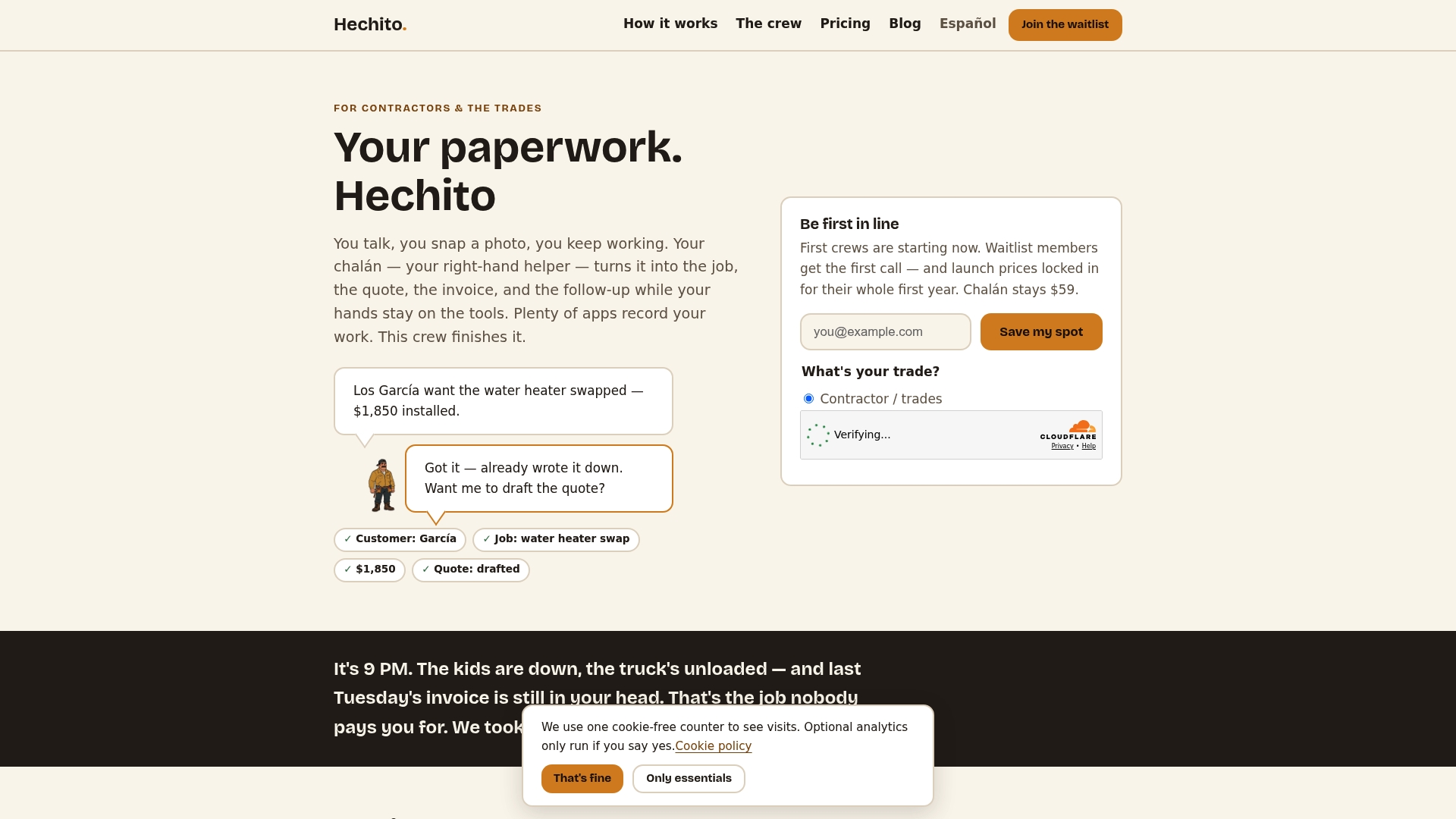
To see the flow from voice note to sent invoice, look at how Hechito works, or go straight to the invoicing and estimate app for contractors. Spanish-speaking crews can start from the Spanish version of the site.
A simple setup you can use this week
You do not need a perfect system to start. Use this order:
- Write your terms. State the due date, accepted payment methods and any late-payment terms on the estimate and the invoice.
- Send invoices the day the work is done. Include the amount, due date and pay link in the email body.
- Schedule a pre-due message 2 to 5 business days ahead, asking whether the customer needs any backup.
- Set two overdue follow-ups with a gentle tone first, then a firmer one that offers a call.
- Add stop conditions: paid, cancelled, corrected, disputed or extended.
- Review the exception list weekly, and call anyone who has passed the last automated step.
- Record payments daily, so the next reminder is never wrong.
Track two numbers for a month: how many invoices were paid before the due date, and how many needed a personal call. If most are in the first group, the sequence is doing its job.
FAQ
What is invoice chase automation?
It is a set of rules that sends payment reminders for you based on an invoice’s due date and status. Messages go out on a schedule, such as before the due date, on it and after it, and stop automatically once the invoice is paid. It saves the repetitive part of collecting while you keep control of disputes and personal calls.
How often should an automated reminder go out?
There is no universal schedule, but a common pattern is one message 2 to 5 business days before the due date, one on the due date, and a couple of follow-ups after it with a firmer tone each time. Adjust the gaps to your payment terms and customer type. A property manager with an approval process may need more lead time than a homeowner.
Do U.S. email rules apply to payment reminders?
The FTC says CAN-SPAM covers business-to-business email, with most provisions not applying to transactional or relationship messages that fit the Act’s categories. Keep headers and subject lines accurate, include a valid postal address, and honor any opt-out request. Ask your attorney if you are unsure how a particular message is classified.
What should stop an automated reminder?
Payment in full, cancellation, a correction to the invoice, a dispute, or an agreed extension. Check the invoice status immediately before each send, and keep a list of exceptions so those customers never receive an automated message at the wrong moment.
Can the same system send invoices in English and Spanish?
Yes, with Hechito. You can speak either language or both on the job, and documents are generated in the language the customer needs. Reminders can then match the language of the original invoice.
Sources
- Payment Reminders & Invoices Workflow, SuprSend
- Automated Payment Reminders for Contractors: Setup Guide, Contractor Merchant Services
- Automating payment reminders, Konrad Kamiński
- CAN-SPAM Act: A Compliance Guide for Business, Federal Trade Commission
- Fair Debt Collection Practices Act, Federal Trade Commission
- Workflow-focused AI reference, Revoxy
Recommended
This is the paperwork Hechito does for you — while you talk.

On iPhone? Coming very soon to the App Store.