How to Write a Construction Daily Report That Holds Up
How to Write a Construction Daily Report That Holds Up
A good construction daily report records who was on site, what they did and where, what slowed them down, and what the weather and visitors were like, written the same day work happened. Keep each entry specific (area, activity, quantity, hours) and finish it by the next working day. That is the whole job. The rest of this guide shows the format, gives example entries, and explains how to get it done without losing your evening.
HechitoCapture Job Details as They HappenHechito turns voice notes and images into organized records, helping contractors document job details without adding end-of-day typing.Visit HechitoTL;DR
- Write the report the day work happens. Never later than the next working day, or it loses value as contemporaneous evidence.
- Cover eight things: project and date, weather, labor, work performed, equipment, delays, safety, and visitors.
- Be specific. “Continued work” proves nothing. “Hung and taped drywall, level 2, units 204 to 208, 3 workers, 6 hours each” does.
- Capture notes and photos on the job, not from memory at 9 p.m.
- You can talk your notes into a record instead of typing them. That is what we built Hechito to do.
Table of Contents
- Why the daily report matters more than it looks
- What to include: the eight core fields
- A daily report format you can copy
- Daily report examples: weak versus strong
- Timing: write it today
- Why reports get skipped, and what it costs
- Make the daily report fast
- Our perspective: the report should write itself from the day
- Where Hechito fits
- Using the report beyond the file cabinet
- Common mistakes to avoid
- FAQ
- Sources
Why the daily report matters more than it looks
Most contractors treat the daily report as paperwork. It is closer to insurance. Construction risk-management guidance from CMAA says that when disputes escalate, every party turns to the daily reports as the primary source of truth. The party with the best contemporaneous documentation tends to win, not the party with the better story.
That plays out in ordinary money problems too:
- A change order the owner says they never approved.
- A delay you say was caused by late materials or another trade.
- A payroll or crew-hours question months after the job.
- An insurance claim after weather damage.
In each case, the question is what you wrote down at the time. A report written two weeks later from memory is weaker than one written on the tailgate, even if every detail in it is true.
One contract tip is also worth knowing. Industry advice reported by Roofing Contractor suggests adding contract language that gives the owner a set window to dispute report entries. If nobody objects in that window, the report is presumed accurate. Ask your attorney how to word that for your state and contract type.
What to include: the eight core fields
A university facilities standard for construction documentation, Yale’s progress documentation requirements%20FINAL%2025_07%20v2.pdf), lays out a useful set of essentials for a defensible report. Here they are in field-ready form.
| Field | What to write | Why it matters later |
|---|---|---|
| Project and date | Job name, address or job number, date, report number | Sequential numbers show nothing was added or removed |
| Weather | Conditions, temperature, wind, and what the weather did to the work | Supports weather delay and time-extension requests |
| Labor | Headcount, company, trade, hours | Backs up payroll, back-charges and crew-hours disputes |
| Work performed | Location, activity, quantity | Proves progress and supports billing |
| Equipment | Used, idle or broken down | Supports standby charges and rental questions |
| Delays | Cause, impact, duration | The core of any delay claim |
| Safety and incidents | Toolbox talk, near misses, injuries, inspections | Protects you with insurers and regulators |
| Visitors | Inspectors, owners, architects, and what they said or directed | Shows who knew what, and when |
Finalize each report with a unique sequential number. It is a small habit that makes the whole file easier to audit.
Weather: say what it did, not just what it was
“Rain” is a weather entry. “Rain 7 to 11 a.m., 0.6 in. by site gauge, exterior framing stopped, crew moved to interior blocking” is a record. The second version ties the weather to its effect on the schedule, and that is the part that counts in a time-extension request.
Labor: names, trades and hours
List each worker or at least each crew with trade and hours. Include subs and their headcount. If you are a small shop, this section doubles as a time record. We go deeper on this in our piece on daily construction logs for payroll and claims.
Work performed: location, activity, quantity
Fieldwire’s guidance, summarized in the research we reviewed, is to capture the “how” and “where” and to avoid vague lines. Use gridlines, room numbers, floors or elevations, and give quantities: linear feet, square feet, cubic yards, fixtures set.
Delays: the line that wins or loses claims
Write what stopped you, who or what caused it, when you noticed, and how long it lasted. Name the person you told. “Waiting on owner decision on tile selection, notified Dana at 8:15 a.m., tile crew idle until 11:30” is the kind of entry that holds up. Broad descriptions give you no leverage later.
A daily report format you can copy
This layout works for a one-crew remodel or a multi-trade site. Trim what does not apply, but keep the order consistent so reports are easy to compare.
- Header: Project name, address, job number, date, report number, your name and role.
- Weather: Conditions, high and low, and effect on work.
- Crew on site: Name or company, trade, hours.
- Work completed: One line per activity with location and quantity.
- Work planned for tomorrow: A short list.
- Materials delivered or short: What arrived, what is missing, who was told.
- Equipment: Used, idle, broken.
- Delays and conflicts: Cause, impact, duration, who was notified.
- Owner or architect directions: Anything verbal that changes scope. Flag it for a change order.
- Safety: Talks held, incidents, inspections.
- Visitors: Name, company, purpose.
- Photos: Three at minimum: overall progress, the work completed, and any issue.
On photos: they carry weight only when they show something specific and are tied to a date and place. Our guide on construction photo documentation rules covers how to shoot them so they stay useful.
Daily report examples: weak versus strong
The fastest way to learn the style is to compare entries. These are illustrative samples we wrote for teaching, not records from a real project.
Work performed
- Weak: Continued drywall work. Some delays.
- Strong: Hung 5/8 in. Type X board on east corridor walls, level 2, gridlines C to F. About 1,100 sq ft complete. Taping starts tomorrow. 3 workers, 8 hours each.
Delay
- Weak: Waiting on materials.
- Strong: Electrical panel for unit 3 not delivered. Supplier said Tuesday. Notified GC superintendent at 7:40 a.m. Rough-in crew of 2 moved to unit 2 for 4 hours, then idle for 3 hours.
Owner direction
- Weak: Owner wanted changes.
- Strong: Owner on site at 2 p.m. verbally asked to move the kitchen island 18 in. toward the window. Told her this affects the plumbing rough-in and is outside the original scope. Change order to follow. Photo 14 shows current layout.
Safety
- Weak: No issues.
- Strong: Toolbox talk on ladder setup at 6:55 a.m., 4 attendees. No incidents or near misses. City inspector Marcus R. visited at 10 a.m.; framing passed.
Notice what the strong entries share: a time, a place, a number, a name. Nothing in them is opinion.
Timing: write it today
Guidance on project documentation says a daily report must be completed the day work is performed and submitted no later than the next working day. The reasoning is simple: courts treat records made at the time as the most reliable. A report assembled a week later invites the other side to question your memory.
This is also who should write it. The same guidance says reports are generated at the foreman level, per crew, because that person saw the work. If you run a small crew, that is you.
Why reports get skipped, and what it costs
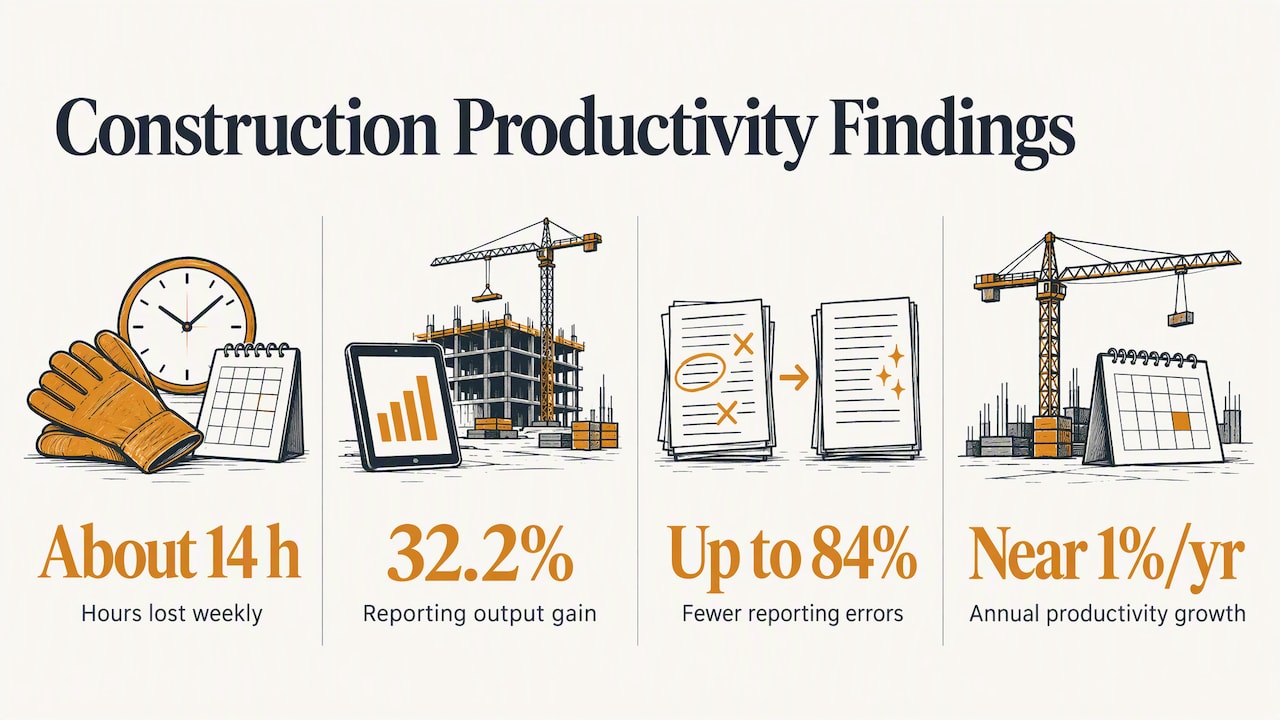
The reason is rarely laziness. It is that the job ends at 4:30, you are tired, and the report means opening a laptop at the kitchen table. Research on construction productivity points the same way. One 2025 study in the ITcon journal found U.S. construction professionals lose about 14 hours a week to non-optimal activities such as searching for data and resolving conflicts. The same paper tested a digital reporting framework and reported a 32.2% increase in reporting output and up to 84% fewer reporting errors. That was one study of one framework, so read it as a signal about direction, not a promise for your shop.
A materials supplier’s analysis of construction communication makes a related point: productivity growth has stagnated near 1% a year, partly because information still moves through fragmented, analog channels. Paper forms, text threads and memory are exactly that.
Make the daily report fast
The fix is to capture at the moment of work and let the formatting happen afterward.
- Use a fixed template. Same fields, same order, every day.
- Shoot photos as you go. Three minimum, more at milestones and problems.
- Dictate, don’t type. Thirty seconds of talking at lunch beats twenty minutes of typing at night. Say the location, the quantity and the headcount out loud.
- Log delays when they happen. Note the time and who you told right then.
- Review for thirty seconds. Check hours, check the date, finalize and number it.
- Keep owner-side logs if you are an owner or CM. A contractor’s report is written from the contractor’s risk perspective, so owners are better protected with their own notes, as the CMAA guidance points out.
Our perspective: the report should write itself from the day
We built Hechito around a plain observation: tradespeople already say everything a daily report needs. They say it to the homeowner, to the supplier, to the helper holding the other end of the board. The problem is that none of it gets written down until the end of the day, if ever.
Most apps only give you a place to type it. That does not remove the work; it moves it. What contractors need is for the conversation and the photos on the job to become the record, so the evening paperwork goes away.
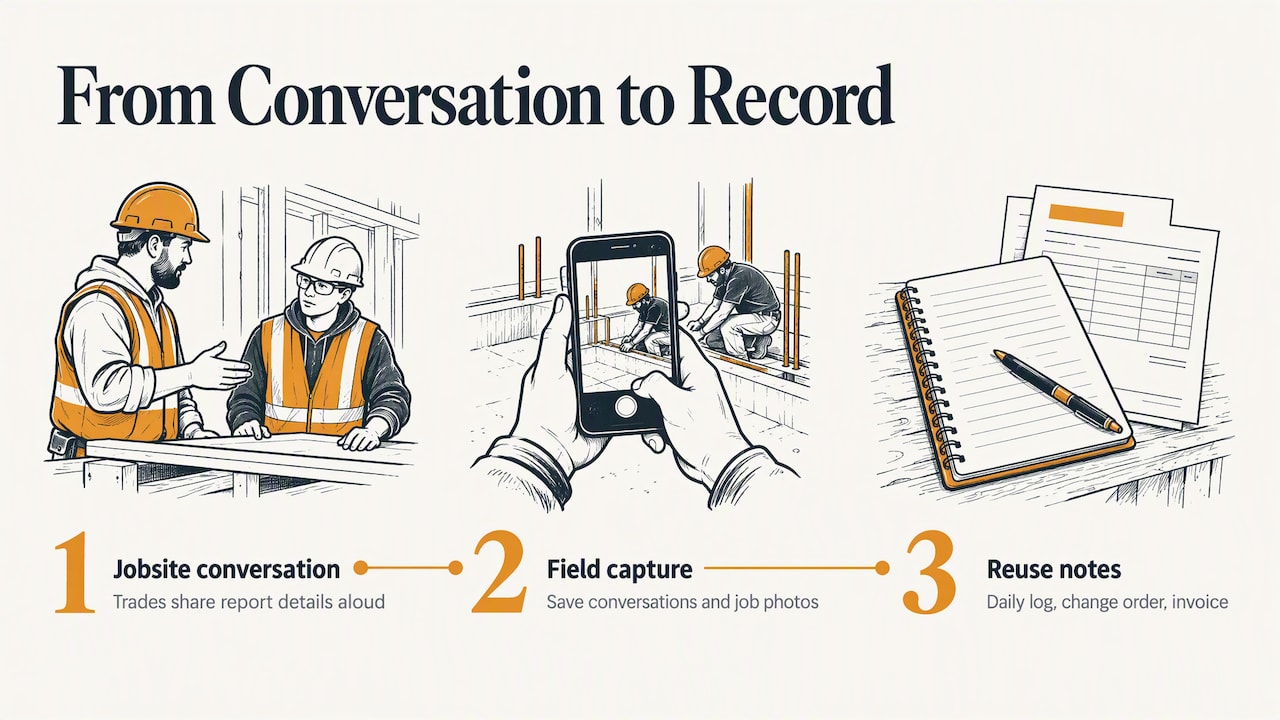
The same notes feed more than the report. A line like “owner asked to move the island 18 inches” is a daily-log entry, a change-order flag, and eventually a line on an invoice. If you record it once, it can serve all three. That is why we connect field capture to quoting and invoicing, and why we work in both English and Spanish: plenty of crews talk on site in one language while the customer paperwork has to be in the other.
Our advice, whatever tool you use: write specifics, write them today, and never rely on remembering. Your future self, and possibly your attorney, will thank you.
— Francisco
Where Hechito fits
If your daily reports pile up at night, Hechito for contractors lets you talk and snap photos on the job, and it files the details for you instead of leaving them in a camera roll and your head. Chalán handles voice quotes and invoices from the job site, and Godínez matches the bank to your jobs when it is time to close the books. You can see how the plans work on the pricing page.
Using the report beyond the file cabinet
A completed daily report is not just a defensive document. It feeds several other parts of the business:
- Billing: Quantities and photos support draw requests. See how field photos help verify draws and keep progress billing moving.
- Job costing: Hours and equipment by day show where a job is gaining or losing money. Our guide on job costing for contractors explains how field data supports your work-in-progress numbers.
- Bookkeeping: Dated receipts and job notes make coding easier, as we describe in bookkeeping for contractors using field capture.
- Disputes over scope: Directions you logged back up the difference between an estimate and a quote, which we cover in preventing estimate versus quote disputes.
Common mistakes to avoid
- Editing history. If you got something wrong, add a correction with the date. Do not overwrite.
- Opinions and blame. “The GC is incompetent” weakens the record. “GC did not release the area until 9:30” strengthens it.
- Skipping slow days. Write “no work, weather” or “waiting on owner decision.” A gap in numbering invites questions.
- Missing verbal directions. If it changes scope or cost, it goes in the report the same day.
- Photos with no context. Note the location and what the photo shows.
- Only recording problems. Reports that show steady progress are what make the problem days credible.
FAQ
What is a construction daily report?
It is the written record of everything that happened on a jobsite in one day: who was there, what work was done, what equipment was used, what went wrong, and who visited. It is usually written by the foreman or lead on site and kept in the project file.
What should be included in a daily site report?
At minimum: project and date, weather and its effect on work, labor with hours, work performed with location and quantity, equipment status, delays with cause and duration, safety items, and visitors. Add photos and any verbal directions from the owner or architect.
How long should a daily report be?
Long enough to answer who, what, where, how much and what got in the way. For a small job that can be half a page. A short, specific report beats a long, vague one every time.
When should I submit a daily report?
The same day, and no later than the next working day. The later you write it, the less it counts as a contemporaneous record. Check your contract, since some require submission by a set time.
Do I need special software to write one?
No. A consistent paper or spreadsheet template works if you actually fill it in daily. Software helps when the real obstacle is time, because voice and photo capture can cut the typing. Whatever you choose, the discipline of writing specifics matters more than the tool.
Sources
- Project Documentation, FASA
- What’s in Your Daily Report?, CMAA
- Construction Progress Documentation, Yale Facilities%20FINAL%2025_07%20v2.pdf)
- Contract Tips to Reduce Risk on Complex Projects, Roofing Contractor
- RealCONs: A Digital Framework for Construction Reporting Accuracy, ITcon
- The Hidden Cost of Outdated Communication in Construction, BMD Materials
Recommended
This is the paperwork Hechito does for you — while you talk.